Retour aux promos
Optii

Affaires

Gratuit

Optii

par Optii Solutions Pty Ltd

v3.27.3 39 Mo Universel 4+

Captures d'écran

Description

Say goodbye to hotel operations inefficiencies and miscommunications across your team and departments. Optii’s app is easy-to-use and provides your staff with everything they need on their own personal device.

Optii allows your hotel to move away from inefficiencies by doing more with less - dramatically increasing staff productivity and team communication. Download this app for access to Optii Service and Optii Chat:

Optii Service allows you to auto-assign jobs to the most appropriate Housekeeper or Engineer with lean service delivery that’s empowered by automation.

• Never miss a job assignment with push notification reminders
• Real-time team management
• Monitor and track job activities
• Improve overall hotel service for a better guest experience

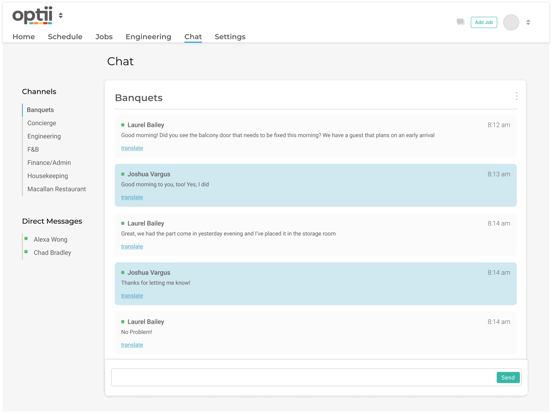
Never miss a message with Optii Chat. With customized channels and one-on-one real-time communication, it encourages proactivity, team work, and employee engagement. It replaces walkie-talkies and outdated hardware with intuitive, intelligent software to digitally transform team communication.

• Department channels
• 1-to-1 realtime direct messages
• Tagging, alerts, and push notification support

The Optii app is free for all Optii customers on all license types.

Nouveautés (v3.27.3)

Release Notes 3.27.3 Week of May 28, 2026
Version 3.27.3 delivers another round of targeted fixes across Checklists, Housekeeping List View, OOO/OOS, and Turndown.
Checklists
• Fixed a persistent issue where checklist items were displaying out of order on existing jobs, even after the template order had been updated. This fully resolves the ordering problem for all jobs going forward.
• Resolved a bug where clicking checklist checkboxes was not saving — selections would appear to register but revert immediately.
• Fixed checklist templates not saving when assigned to a Repeating Job template — the selection was being lost on save and not carrying through to generated jobs.
Housekeeping List View
• Fixed the Auto-Assign button not updating when filtering by location or floor — it was incorrectly assigning all jobs rather than only those in the filtered view.
• Resolved the Auto-Assign button not activating automatically when a new timeline was created, requiring a manual page refresh to enable it.
OOO/OOS
• Fixed an issue where rooms configured with a "No Job Needed" early removal rule were still generating a departure or check job when returned from Out of Order ahead of schedule.
Turndown
• Fixed TD job creation incorrectly cancelling active inspection jobs on the same room when the "Link TD and room status" setting was turned off. Inspections now run uninterrupted alongside TD jobs as intended.
Job Assist
• Fixed Job Assist options not appearing when adding a job on first login — users were required to force-close and reopen the app before they would appear.
Backend
• Fixed the bulk user import script failing to correctly create all user accounts, resulting in some users being unable to log in after onboarding.

Have Questions? Your Optii Success Manager is here to help! Call us: North America: +1 855 398 1447 Asia: +852 3008 0288 Europe: +44 20 3037 8851 Australia/NZ: +61 7 5292 5166 Email us at: help@optiisolutions.com