Description
Welcome to Aviator Assistant, your ultimate co-pilot for a safer and more efficient flying experience. Plan, brief, and file your flights with ease, using our advanced tools, briefing utilities, and high-quality charts.
Features
Flight Planning & Filing: Centralize your information for safer, more efficient flying. Our intuitive route manager lets you set up a route in seconds, providing insights into weather, NOTAMs, and TFRs along your planned path.
Access to ASA's 2026 FAR/AIM: Easy and convenient access to ASA's 2026 FAR/AIM within Aviator Assistant, bringing easy to browse and search functionality to flight training, flight planning and also the cockpit.
Pilot Log Books: Maintain meticulous records with our digital pilot log books, designed for ease and accuracy.
Weight and Balance Tools: Ensure safe and efficient flights with our comprehensive weight and balance calculators, tailored to your aircraft's specific parameters.
Reliable Weather Tools: Make informed pre-flight decisions with real-time animated NEXRAD radar, global winds-aloft, turbulence information, METARs, TAFs, Airsigmets, and more.
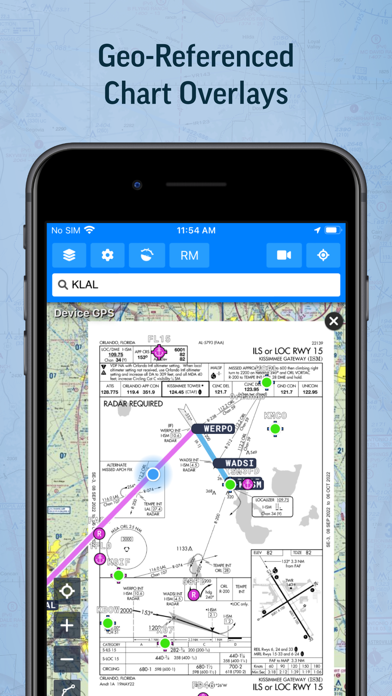
High-Quality Charts: Fulfill all your VFR and IFR needs with VFR Sectionals, High/Low Instrument Enroute charts, and Procedures (SIDs, STARs, approaches, and taxi charts).
Briefing Tools: Comprehensive briefing tools to help you prepare for your flight with precision and confidence.
Radar Playback: Leverage the latest NEXRAD radar data for an accurate representation of the weather conditions.
Synthetic Vision: Enhance your situational awareness with our Synthetic Vision tool, offering insights into traffic, obstacles, runways, terrain warnings, and more.
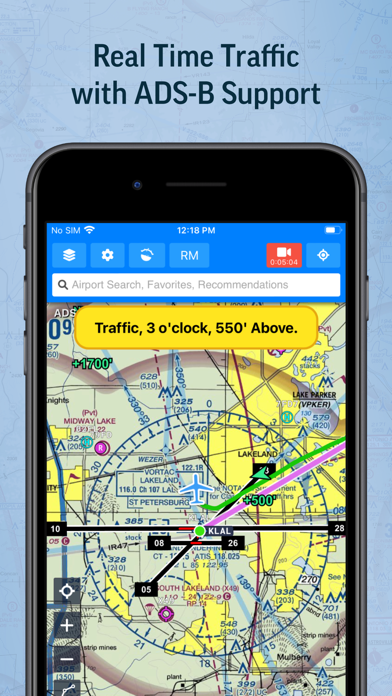
ADS-B Support: Benefit from real-time traffic reports, in-flight weather data, and Synthetic Vision terrain data with our advanced ADS-B integration.
Aircraft Performance Calculator: Store your aircraft's performance information for faster flight planning and accurate ETA calculations.
Scratch Pads: Keep track of ATIS updates, clearances, PIREPs, and more with our handy Scratch Pad templates.
Essential Information: Access communication frequencies, weather forecasts, NOTAMs, procedures, runways, and more - all in one place.
Offline Access: Download specific data and charts for offline use in the air.
Aviator Assistant requires a subscription, visit our website for more information.
Please Note: Location is used to provide navigation services over a moving map, and the camera is used to submit Instructor documentation for account configuration.
Embrace the future of flying with Aviator Assistant. Download now and elevate your aviation experience today!
Nouveautés (v4.4.0)
New & Improved
• Editable ETE — You can now manually adjust Estimated Time Enroute in the Flight Planner before filing a flight plan. Handy when your route includes holds or procedure turns the navlog doesn't yet account for, and important for accurate search-and-rescue timing.
• Customizable bottom tab — The fifth tab now adapts to the tool you use most from the More menu (Pilot Logbook, Aircraft, Documents, Weight & Balance, ADS-B Status, and more) so it's always one tap away. Flights is now in the More menu too.
• Stay awake on every screen — Your device now stays awake and unlocked on any tab in flight, not just the map.
Fixes
• Closed flight plans no longer show Amend or Cancel — flight plan status now stays in sync after a plan is closed.
• Airport markers are now selected first when you tap, even when traffic icons sit on top of them — and tapping is faster and more responsive.
• Internet traffic automatically thins out when you're zoomed far out, so the map stays readable.
• Traffic detail popups are now legible in Dark Mode.
• On the sign-in screen, the email/password fields and Sign In button now stay above the keyboard, and the Reset Password screen has a Back button.
• UI polish throughout: Share menu layout, modal buttons, loading indicators, tab labels, and flight-stats positioning.
Questions or feedback? support@aviatorassistant.com