Retour aux promos
MoneyGo App

Finance

Gratuit

MoneyGo App

par JUXIN TECHNOLOGY CO., LTD.

v4.0.4 32 Mo Universel 4+

Captures d'écran

Description

就近匯款據點,一鍵導航
開啟定位即可找到最近的匯款服務點;距離自動排 序並顯示公尺/公里,支援 Apple/Google 地圖導航與門市電話,一鍵前往更省時。
MoneyGo「附近匯款地點」幫你在陌生城市也能快速完成匯款。開啟定位後,App 會自動依距離由近到遠列出可匯款的合作門市/據點,清楚標示公尺或公里,並提供導航與聯絡方式,減少來回奔波與等待。
MoneyGo「跨國匯款」讓在台印尼用戶能快速、透明、安全地匯款回家。輸入金額後,App 會即時計算匯率、手續費與實際到帳金額,並提供收款人管理、交易進度查詢與匯款點數累積功能,讓每一次匯款都更划算、更便利。

主要功能 :
1.就近搜尋:自動以距離排序,清楚顯示公尺/公里。
2.一鍵導航:支援開啟 Apple 地圖或 Google 地圖,快速帶路到店。
3.立即聯絡:卡片顯示門市電話與地址,點擊即可撥打或複製。
4.關鍵字篩選:可依名稱、地址快速過濾,迅速找到目標門市。
5.輕量介面:載入迅速、操作直覺,適合臨時要匯款的情境。
6.即時試算:輸入匯款金額後,自動顯示匯率、手續費與到帳金額。
7.收款人管理:可新增、編輯、收藏家人與朋友的收款資訊,下次匯款更快速。
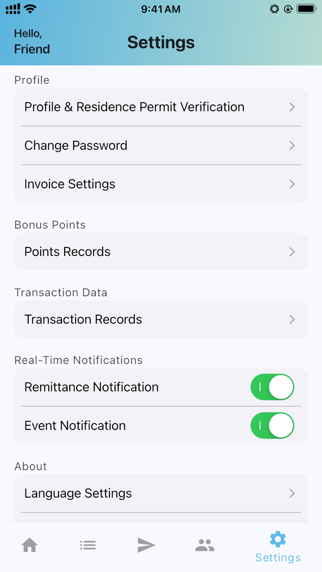
8.匯款點數:完成匯款後自動累積點數,可兌換活動禮品或優惠折抵。
9.交易追蹤:可查看匯款進度、完成狀態與完整紀錄。
10.超商付款:支援多家超商付款方式。

如何使用
1.允許 MoneyGo 使用「定位服務(使用 App 期間)」。
2.立即看到附近可匯款據點,並依距離排序。
3.點選卡片即可導航或撥打門市電話,快速完成匯款流程。
4.選擇 MoneyGo「跨國匯款」服務。
5.輸入匯款金額後立即看到匯率與手續費試算結果。
6.選擇或新增收款人資訊。
7.確認內容後提交匯款並選擇付款方式。
8.查看匯款進度並累積點數,每次匯款都更划算。

Nearby Remittance Locations — One-Tap Navigation
Enable location services to instantly find the closest remittance service points. Results are automatically sorted by distance and displayed in meters/kilometers. Supports Apple Maps and Google Maps navigation, plus in-app store phone numbers for one-tap calling.
MoneyGo’s “Nearby Remittance Locations” helps you complete remittances quickly—even in unfamiliar cities. Once location access is enabled, the app automatically lists participating remittance partners from nearest to farthest, clearly showing the distance (meters or kilometers) and providing navigation and contact options, reducing unnecessary travel and waiting time.
MoneyGo’s “Cross-Border Remittance” allows Indonesian users in Taiwan to send money home quickly, transparently, and safely. After entering an amount, the app instantly calculates exchange rates, fees, and the final payout amount. It also supports recipient management, transaction tracking, and reward point accumulation—making every remittance more cost-effective and convenient.


Key Features

1.Nearby Search: Automatically sorted by distance with clear meter/kilometer indicators.
2.One-Tap Navigation: Open Apple Maps or Google Maps to get directions instantly.
3.Instant Contact: Each card displays store phone numbers and addresses; tap to call or copy.
4.Keyword Filtering: Quickly search by store name or address to find what you need.
5.Lightweight Interface: Fast loading and intuitive design—ideal for time-sensitive remittance needs.
6.Real-Time Calculator: Enter the remittance amount to instantly view exchange rates, fees, and final payout.
7.Recipient Management: Add, edit, and favorite family or friends’ recipient information for faster remittances next time.
8.Remittance Points: Earn points automatically after each transaction; redeem them for gifts or discounts.
9.Transaction Tracking: Check remittance progress, completion status, and full transaction history.
10.Convenience Store Payments: Supports multiple convenience-store payment methods.

How to Use

1.Allow MoneyGo to access Location Services (While Using the App).
2.Instantly see nearby remittance points sorted by distance.
3.Tap a store card to navigate or call directly for faster service.
4.Select MoneyGo’s Cross-Border Remittance feature.
5.Enter the remittance amount to view real-time exchange rate and fee calculations.
6.Select or add recipient information.
7.Confirm the details, submit the remittance, and choose your payment method.
8.Track remittance progress and accumulate reward points—making every transfer more rewarding..

Nouveautés (v4.0.4)

Fixed bonus points bug