Description
**Transform Your Conversations into Actionable Insights**
This app is designed to be simple to use.
Never lose track of any meetings, or conversations again. Our powerful app combines cutting-edge speech recognition with intelligent AI to turn your conversations into organized, actionable content, powered by OpenAI's industry-leading Whisper technology to capture every word.
**Security First:** Transcription happens entirely on your device for maximum security and works even without network access. Your conversations are never recorded or stored - only the text transcription remains.
**What Makes This App Special:**
**Effortless Voice Capture** - Simply click start, set your phone on the table, and speak naturally. The entire conversation is captured and converted to text in real-time.
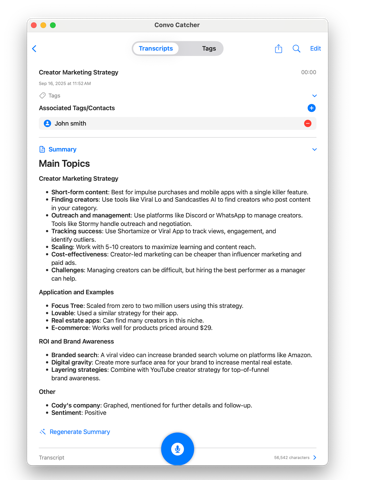
**Smart Summaries That Actually Help** - Get instant, AI-generated summaries that capture the key points from your transcriptions. Customize the summary style to match exactly what you need - whether it's meeting notes, creative ideas, or personal reminders.
**Ask Questions** - Use AI to ask questions ....not just keyword search... of your transcripts.
**Stay Organized with Tags** - Tag transcripts by person, topic, or project and filter your library in seconds.
**Sync Across All Your Devices** - iCloud sync keeps your transcripts up to date on your iPhone, iPad, and Mac automatically.
**Share with Anyone** - Send a transcript directly to another ConvoCatcher user with a single tap, or share rich text via iMessage and other apps.
**Never Forget Where Ideas Strike** - Automatically tags each transcription with your location, so you'll always remember the context behind your conversations.
**Works Even When You're Busy** - Keep transcribing in the background while you use other apps or when your phone is locked. Perfect for long meetings, lectures, or brainstorming sessions.
**Made Your Way** - Fully customizable settings let you tailor the app to your workflow, from summary formats to transcription preferences.
**Available on iPhone, iPad, and Mac** - A native experience on every device, with a redesigned sidebar layout on Mac.
**Perfect For:**
- Professionals capturing meeting notes
- Students recording lectures
- Doctor appointments and consultations
- Writers collecting inspiration on-the-go
- Anyone who thinks faster than they can type
Turn every conversation into organized, searchable content that's ready when you need it.
visit www.conversationcatcher.com
Terms of Use: https://www.apple.com/legal/internet-services/itunes/dev/stdeula/
Nouveautés (v2.2)
New 2.2
- Added ability to Start Transcription from an iOS Shortcuts. Create a shortcut with Conversation Catcher Start Transcription action and assign it to the iPhone Action Button (left side, top) to start transcription in an instant
New Features 2.1
- Full Mac support with a redesigned sidebar layout and Markdown rendering
- iCloud sync keeps your transcripts up to date across all your devices
- Share transcripts directly with other ConvoCatcher
- Rich text sharing for iMessage and other apps
- Backup export to save your transcripts externally
- Openclaw access: visit conversationcatcher.com/openclaw/
Improvements
- Copy your iCloud path directly from Settings
- Start Transcription button shows a loading indicator while the transcription engine initializes
- Transcripts load faster in the main list
Bug Fixes
- Fixed an issue where the pause timer did not stop when recording was paused
- Fixed duplicate buttons appearing on the search screen
- Fixed text color issues on Mac
- Various stability and performance improvements