Description
ShotMark : Notes pour captures d’écran
Les captures d’écran sont faciles à prendre, mais difficiles à organiser ensuite.
ShotMark transforme vos captures d’écran en notes faciles à rechercher, afin que les informations importantes ne se perdent pas dans votre photothèque.
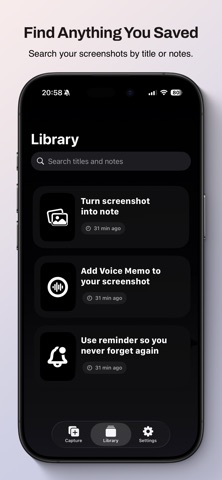
Enregistrez vos captures sous forme de cartes légères, ajoutez des notes, classez-les dans des dossiers, recherchez-les plus tard et retrouvez rapidement ce qui compte.
Conçu pour rester simple, rapide et centré sur l’essentiel.
Fonctionnalités
Enregistrez vos captures avec leur contexte
- Ajoutez des notes aux captures d’écran
- Classez les cartes dans des dossiers
- Gardez vos références importantes faciles à retrouver
Détection de texte par OCR
- Détectez le texte dans les captures d’écran
- Copiez facilement le texte détecté
- Avec ShotMark Pro, recherchez du texte dans vos captures d’écran
Accès rapide
- Recherchez instantanément dans les notes et les titres
- Retrouvez vos captures plus vite, sans défilement interminable
Export épuré
- Exportez vos cartes sous forme d’images épurées, prêtes à partager
- Un design minimaliste, sans modèles surchargés
Synchronisation iCloud
- Synchronisez vos cartes sur vos appareils Apple avec ShotMark Pro
Pensé pour rester léger
- Aucun abonnement
- Aucun espace de travail complexe à configurer
- Aucun contenu superflu généré par l’IA
- Uniquement consacré à l’organisation des captures d’écran
Qu’il s’agisse de reçus, de conversations, d’idées, de références ou d’informations sur des produits, ShotMark garde vos captures d’écran organisées et faciles à retrouver grâce à la recherche.
Nouveautés (v1.3.2)
ShotMark 1.3.2 améliore la fiabilité du partage et de la synchronisation.
• Les cartes créées depuis le menu Partager se synchronisent désormais correctement entre vos appareils via iCloud.
• Ajout de l’allemand, du japonais, du français, de l’italien, du portugais (Portugal) et de l’espagnol.
• Les traductions en chinois simplifié et traditionnel sont maintenant complètes dans toute l’app et le parcours Mac.
• Un nouvel écran Nouveautés, affiché une seule fois, présente les principaux changements.
• Amélioration des formulations et de la gestion des pluriels.