Description
⏺ NoiseBox: Personal Soundboard ⏺
NoiseBox turns your iPhone into a customizable soundboard. Whether you need quick sound effects for content creation, live performances, games, or just for fun. NoiseBox puts your audio clips one tap away.
⏺ Instant Playback
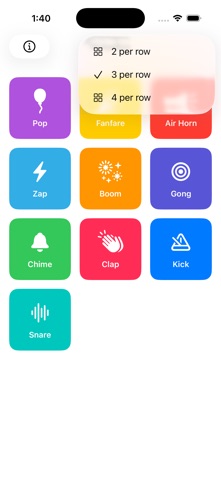
Tap any tile to play its sound immediately. A clean grid layout keeps all your clips organized and easy to reach.
⏺ Fully Customizable Tiles
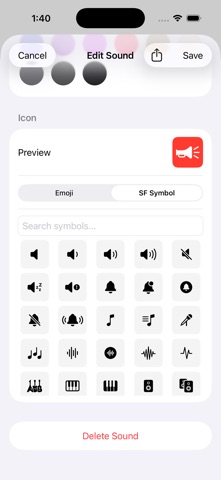
Make each tile your own. Set a name, choose a background color, and assign an icon, either an emoji or any SF Symbol. At a glance, you always know exactly what you're about to trigger.
⏺ Your Audio, Your Way
Import any audio file from your device to add it to your board. NoiseBox also includes a set of built-in sample clips to get you started right away.
⏺ Apple Watch Support
Play sounds directly from your wrist. Your soundboard syncs automatically to the NoiseBox Watch app, so your clips are always at hand, even when your phone is in your pocket.
⏺ iCloud Sync
Your tiles, colors, icons, and custom audio sync automatically across all your devices via iCloud. Set it up once and it's everywhere.
⏺ Sound Sharing
Share your favorite sounds with friends and family using the Share button in the Edit Sound screen.
⏺ Groups
Create groups of your sounds for different occasions or events.
⏺ Record your own sounds
You can now record your own sounds in addition to importing sound files.
⏺ Widgets
Use Home Screen widgets to play your favorite sounds right from your Home Screen.
⏺ Import from Video
Import audio from videos in your Photo Library, and trim just the portion you want.
Nouveautés (v1.7)
Fresh Settings screen
Settings has been redesigned to make it easy to find About, Credits, and your sound data, with room to grow.
Louder, clearer sounds
The per-sound volume control now reaches higher, so quiet clips can be boosted to the level you want. The default sits right in the middle, so it's easy to find your way back.
Better board management
Deleting a board now lets you move its sounds to another board instead of losing them.
New Feature for NoiseBox Supporters
Share a whole board with friends and family. They can add your sounds to their own NoiseBox in a tap.
Support NoiseBox to unlock board sharing and six alternate app icons and help keep the app free for everyone.
Plus a number of fixes and polish throughout.