Description
Carmel Guide is your pocket companion for exploring Carmel-by-the-Sea and the greater Monterey County area. Browse over 464 hand-picked local businesses across dining, shopping, galleries, wineries, outdoor activities, hotels, and essential services.
DISCOVER LOCAL FAVORITES
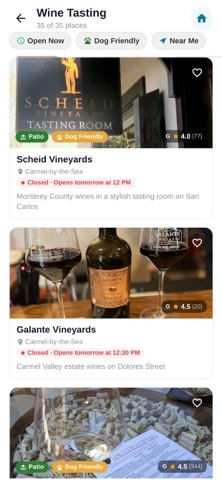
Explore curated listings for restaurants, cafes, bakeries, wine tasting rooms, art galleries, boutique shops, spas, and more. Each listing includes photos, hours, location, phone number, and website so you have everything you need at a glance.
DOG-FRIENDLY GUIDE
Carmel is one of the most dog-friendly towns in America. Find restaurants with dog-friendly patios, pet-welcoming hotels, off-leash beaches, and pet supply shops — all in one place.
OUTDOOR DINING
Discover the best patios, courtyards, and ocean-view terraces for al fresco dining along the Monterey Peninsula.
TOURIST TOOLS
Built-in tools designed for visitors: a parking meter timer with alerts so you never get a ticket, a tip calculator for quick dining math, a currency converter for international travelers, and a menu translator to help decode local cuisine.
EXPLORE BY AREA
Browse businesses across Carmel-by-the-Sea, Pacific Grove, Monterey, Big Sur, Carmel Valley, Pebble Beach, and Seaside. Whether you are planning a weekend getaway or a week-long vacation, find exactly what you need in every corner of the county.
SAVE YOUR FAVORITES
Bookmark the places you love and build your own personalized guide to revisit anytime.
REAL-TIME WEATHER
Check current conditions and the forecast before heading out to explore the coast.
Carmel Guide is free to use with no account required. All data is stored locally on your device for fast, private access.
Nouveautés (v1.0.76)
This update improves the experience for business owners managing their listings.
Canceling a subscription now shows a confirmation screen before anything is removed
A success message appears after canceling or saving changes
Business owners can now preview exactly how their promotion will look in the Deals tab before saving
Save and Cancel buttons are disabled while changes are being processed to prevent duplicate actions