Description
I built Time In Focus for myself as much as for anyone.
I kept sitting down to do real work and then watching an hour go somewhere else. The problem was never that I didn't want to focus — it was making my phone less distracting, and having something to show for my work. So I made the thing I needed: a quiet timer that holds the line I set, and a way to close the apps that pull at me before they get the chance.
It doesn't do anything clever. It keeps time, holds the line you set, and shows you what you did. That's it. I use it every day.
FOCUS SESSIONS
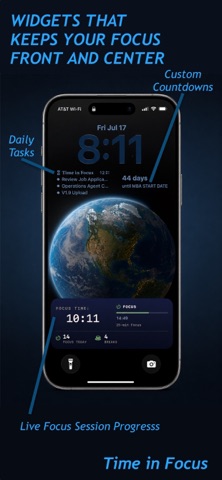
Pick a 25-minute sprint for something small or a 45-minute block for deep work. When the session ends, a break timer gives you room to step back before the next one. Set a daily goal, keep a streak if streaks help you, and have something to look back at.
FOCUS SHIELD
This is the part I lean on most. Before you start, you choose the apps you don't want to reach for. Once the session begins, the shield holds them closed for the whole thing — no override, no "just five minutes." It's not enforcement. It's a door you can close, and a reminder of what you decided when you sat down. The apps are still there when you're done; they just don't get you mid-session.
TASKS
Add what you're working on before or during a session and check things off as you go. When a stray thought shows up — and it always does — the parking lot catches it, so you can set it down and stay where you are instead of chasing it.
FOCUS VISUALS & SOUND
Turn the screen into something quieter to sit with. More than fifteen visuals — Aurora, Grid, and Glass among them — shift slowly as the session runs. Pair them with rain, a cafe, or lo-fi if quiet isn't your thing.
WHAT YOU DID
A weekly calendar, a daily session chart, and lifetime stats. Not a scoreboard — a receipt. The days you actually showed up, kept where you can see them.
BADGES
Small markers along the way, from your first ten sessions out to the far end. They're there if you like them, easy to ignore if you don't.
THE SMALL STUFF
A flip clock shows the current time, so you don't reach for your phone to check it
Dark and light themes with accent colors you pick
A home screen widget with today's progress at a glance
A daily reminder, if you want one
Works in portrait and landscape
YOUR DATA STAYS YOURS
Everything lives on your device. No account to make, no tracking, no ads. I never see your sessions, and there's nothing to sell. Your focus is yours.
GETTING STARTED
You get three focus sessions to try, free — no account, nothing to sign up for. If it clicks and you want to keep going, Pro makes your focus sessions unlimited. New here? You start with 14 days of Pro free — nothing charged today, no pressure. After that, only if it's earned a place in your day.
I hope it helps you get real work done. — Selim
Privacy Policy: https://seamlessmigration.ai/privacy-policy
Terms of Use (EULA): https://www.apple.com/legal/internet-services/itunes/dev/stdeula/
Nouveautés (v2.1)
SCREEN TIME REPORTS — NOW TRULY IN YOUR HANDS
If you read about reports in the last update and couldn't find them:
that was our miss, not yours. A build flag held them back, and this
update sets them loose. Thank you for your patience.
The Tracking tab can now show you where the rest of your hours went —
which apps pulled at you hardest, how that traded against the time you
spent in focus, and what shifted since last week.
The numbers are computed inside a sandboxed Apple extension on your
phone. They have no route off the device, and I never see them.
There's a wait built in. TIF watches for seven days before the first
report, so what you get back is a real week rather than an afternoon.
You'll see the days fill in while it works, and an example report in
the meantime so the shape of it isn't a surprise.
Reports are part of Pro, on iPhone. New here? Your first 14 days have
everything open.
ALSO IN THIS UPDATE
- The Pro feature lists across the app now match what Pro actually
includes.
- On iPad, the reports section explains its iPhone scope plainly
instead of showing empty charts.
- The day-seven reminder keeps to a reasonable hour.
- Assorted fixes to layout and wording.