Description
For musicians and music lovers.
SoloTracks began with a simple idea: the music you own should be easy to listen to—and the music you're learning should be easy to practice.
It's a versatile offline player for your MP3, M4A, and WAV files—whether your library holds favorite songs, full albums, demos, live takes, rehearsal recordings, backing tracks, or works in progress.
Now, with a beautiful ground-up redesign and selectable themes, SoloTracks has never looked better.
MAKE IT YOURS
• A refreshed, modern design throughout—cleaner, faster, and easier to navigate.
• Choose from four hand-tuned themes—Aurora, Ember, Mint, and Ink—and recolor the entire app in a tap.
• A redesigned Home that picks up right where you left off.
A BETTER HOME FOR YOUR MUSIC
• Keep the music you own together in one clean, organized library.
• Import MP3, M4A, and WAV files, complete with embedded artwork and track information.
• Transfer songs over Wi-Fi from your Mac using a web browser—no cables or iTunes.
• Sort your library your way, build your own playlists, or let smart playlists group your music automatically.
• Enjoy shuffle, repeat, queues, precise scrubbing, and Lock Screen and Control Center playback.
• Set a sleep timer for the end of a song or a chosen length of time.
• Listen anywhere, without a connection.
BUILT FOR PRACTICE
SoloTracks gives singers and musicians practical tools for learning, rehearsing, and playing along.
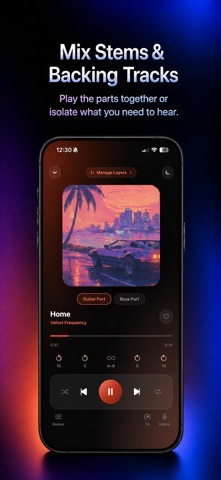
• Loop any passage with A–B markers.
• Slow tricky sections down or speed them up—without shifting the pitch.
• Organize stems and alternate versions with Layers, then switch between them or play them together.
• Follow synced lyrics, test yourself from memory, and repeat individual phrases until they feel natural.
TRY EVERY PRO FEATURE FREE FOR 7 DAYS
Take SoloTracks Pro for a seven-day test drive. After that, unlock the complete app with a single one-time purchase. No subscription. No recurring fees. No endless upsells.
Prefer to keep things simple? SoloTracks is free for libraries of up to 50 songs.
JUST YOU AND YOUR MUSIC
There's no streaming catalog, advertising, social feed, listening surveillance, or recommendation algorithm competing for your attention.
SoloTracks plays the music you chose—and helps you hear it more closely.
Made with care for listeners, singers, and musicians.
Nouveautés (v2.1.0)
A big one. SoloTracks has been redesigned from the ground up, with new themes and refinements throughout.
A FRESH NEW LOOK
• A beautiful, modern redesign across the whole app—Home, Library, Player, and Settings.
• A new Home screen that picks up right where you left off, with quick access to recent tracks and smart playlists.
MAKE IT YOURS
• Four selectable themes—Aurora, Ember, Mint, and Ink—recolor the entire app in a tap.
EASIER TO USE
• New Settings screen with library stats and playback preferences, including haptics and keep-screen-awake.
• New How-To Guide: step-by-step instructions for importing music, syncing lyrics, A–B loops, and layered tracks
• Sort your library by Recent, Date Added, Title, or Artist, with an ascending/descending toggle.
• Faster playlist creation—jump straight to adding songs.
• Long song titles now scroll instead of getting cut off.
• Smoother, more forgiving A–B loop marker dragging.
• Clearer lyrics and membership screens.
FIXES & STABILITY
• Fixed Wi-Fi transfer when dragging in multiple files or a whole folder at once.
• Numerous performance improvements and stability fixes throughout.
Thanks for using SoloTracks. As always: no ads, no subscriptions, no tracking—just your music.