Retour aux promos
SyncUp-Client

Utilitaires

Gratuit

SyncUp-Client

par Siddarth Ruchir Kumar

v1.1.13 40 Mo Universel 4+

Description

SyncUp is an open-source client for the Syncthing protocol.
A peer-to-peer file synchronization protocol that has been around since 2014.

If you already run a Syncthing node on your computer, NAS, or home server, SyncUp lets your iPhone join the same network of devices and keep selected folders in sync.
All transfers happen directly between devices you own, end-to-end encrypted with TLS 1.3.

This app does not host or store your files on any third-party server. It connects only to peers you have explicitly authorized.

FEATURES

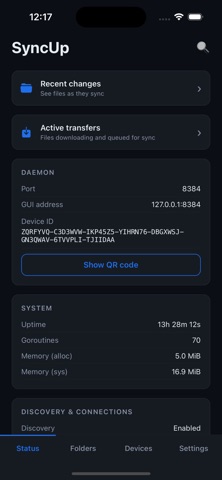
• QR code device pairing -> scan a peer's code or display your own. The 56-character device ID never has to be typed by hand.
• Folder sharing controls -> accept, ignore, or auto-accept folder offers from peers you trust.
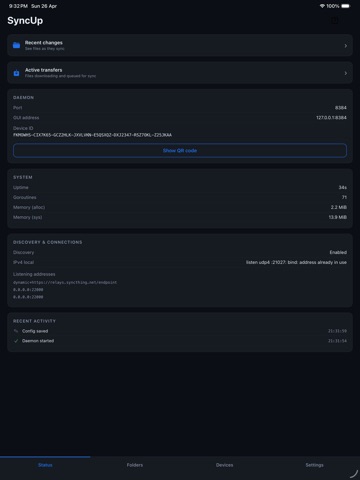
• Live status -> folder progress, peer connection state, and incoming offers update in near real time.
• Per-folder pause and resume from Settings.

HOW SYNC WORKS ON IOS

iOS reserves continuous background execution for a small set of app categories that SyncUp does not belong to. Sync runs in the foreground whenever the app is open, and SyncUp also registers two background tasks that the system schedules opportunistically, typically a short window or two per day, with the exact timing controlled by iOS.
For an always-online node, run a Syncthing instance on a computer or home server that stays powered on.
Your iPhone reconciles against it whenever it next runs.

OPEN SOURCE

SyncUp is licensed under MPL-2.0.
The Syncthing daemon is embedded in-process and the full source code is available on GitHub.

REQUIREMENTS

You will need at least one other device running Syncthing (on macOS, Windows, Linux, Android, or another iOS device with this app) for SyncUp to be useful. Visit syncthing.net
to learn more about the protocol.

Nouveautés (v1.1.13)

Sync your Obsidian vault, conflict-free
New "Obsidian vault" folder preset with minimal/recommended/strict ignore presets. It excludes the workspace.json churn that normally produces .sync-conflict-* files and sets a
sane rescan interval so note edits propagate quickly. A free, peer-to-peer, end-to-end-encrypted alternative to Obsidian Sync.

Built-in conflict resolver for notes
When two devices edit the same Markdown file, a side-by-side merge view lets you resolve sync conflicts in-app instead of hunting down .sync-conflict files.

Folder ignore-pattern editor
Edit a folder's ignore patterns directly in the app, with one-tap presets.

Sync to folders outside the app
iOS folder picker (scoped bookmarks) so you can pick and persist external destinations rather than being confined to in-app storage.

Guided onboarding
A first-run coach walks new users through devices, folders, and settings.

Smoother large-folder handling
The UI now waits for big folder scans to finish before marking a folder ready, so accepting/adding large folders no longer looks broken mid-scan.

Reliability: automatic port fallback
If port 8384 is already taken, the backend picks another instead of crashing on startup.