Description
Type numbers faster than ever before.
NumPad Pro replaces the slow default keyboard with a dedicated numeric keypad you can use in any app. Whether you're entering scores, calculating finances, or filling forms — switch to NumPad Pro and feel the speed difference instantly.
WHY NUMPAD PRO:
Built specifically for people who type numbers all day. No more switching to the symbols screen. No more tiny digit keys. Just a clean, big-button numpad that works system-wide — in Notes, Messages, Mail, browsers, spreadsheets, and any app that accepts text input.
WHAT YOU GET:
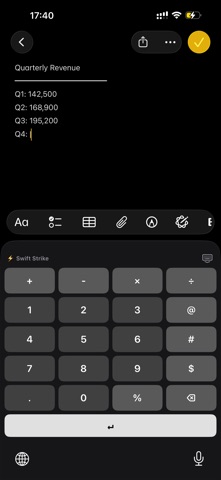
- Full numeric keypad with 0-9, decimal point, backspace, and return
- Beautiful Light & Dark mode that follows your iPhone settings
- Haptic feedback on every key press for a satisfying tactile feel
- Optional key click sounds you can toggle anytime
- Hold-to-delete with native iOS acceleration — same speed as Apple's keyboard
- Live in-app preview to test the keyboard before switching
- Native iOS feel — designed to match Apple's keyboard look exactly
- Operator Row: + − × ÷ floating above the numpad for instant math input
- Symbol Column: @ # $ % beside the digits for emails, hashtags, and prices
PERFECT FOR:
- Gamers entering codes, stats, IDs, scores, and damage numbers
- Traders and finance pros working with figures, percentages, and formulas
- Accountants and bookkeepers tired of toggling between keyboards
- Spreadsheet users who need fast numeric input on the go
- Form fillers entering phone numbers, prices, dates, and ID numbers
- Power users who value speed, precision, and clean design
HOW TO ENABLE:
1. Open iPhone Settings
2. Tap General → Keyboard → Keyboards
3. Tap "Add New Keyboard…"
4. Select NumPad Pro from the list
5. Tap NumPad Pro → enable Allow Full Access (optional, enables haptics)
While typing in any app, tap the globe key on your keyboard to switch to NumPad Pro. Switch back the same way.
PRIVACY FIRST:
NumPad Pro never logs, stores, or transmits anything you type. The keyboard works fully offline. Your keystrokes stay on your device — period. We don't run analytics, we don't include third-party trackers, and we don't have a server that sees your data. Read our full privacy policy for complete transparency.
DARK MODE DONE RIGHT:
NumPad Pro automatically matches your device's appearance. The keyboard looks stunning in both modes — sharp contrast in light mode, easy-on-the-eyes charcoal in dark mode. Or pin it to one mode in settings.
WORKS EVERYWHERE NUMBERS DO:
Notes, Messages, Mail, Safari, Chrome, Numbers, Excel, Google Sheets, banking apps, calculator apps, password managers, form fields, search bars — anywhere iOS shows a keyboard, NumPad Pro works.
SUPPORT:
Questions, feedback, or feature requests? We read every email. Reach us at codebuster2021@gmail.com — we usually reply same-day. Got an idea for a feature? Tell us. The roadmap is shaped by people who actually use the app.
Nouveautés (v1.0.2)
iPad support, a customizable Enter key position (bottom/top/right), and improved light/dark readability.