Description
Printer App transforme votre iPhone et votre iPad en une station d’impression mobile simple et privée. Imprimez PDF, documents, photos et pages web sur des imprimantes Wi-Fi, AirPrint et réseau compatibles, à la maison, au bureau ou à l’école. Sans câble, sans ordinateur, sans complication.
Imprimez presque tout
Envoyez directement à votre imprimante des PDF, documents Word et texte, photos JPEG et PNG, pages scannées et pages web entières. Importez depuis Fichiers et iCloud Drive, choisissez des photos, scannez du papier ou ouvrez des fichiers partagés depuis Mail et d’autres apps.
Scannez en PDF avec votre appareil photo
Transformez documents papier, reçus, formulaires et notes en PDF nets et prêts à imprimer. La détection des bords capture des pages bien cadrées : une photo rapide devient en quelques secondes un document soigné et imprimable.
Des réglages d’impression avancés que vous maîtrisez
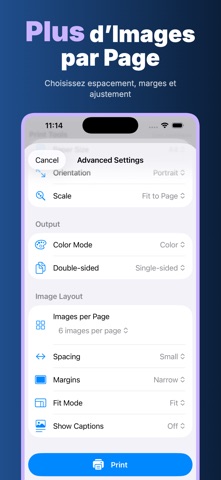
Allez au-delà d’un simple bouton d’impression : plage de pages, nombre de copies, format de papier (A4, Letter, Legal, A3, A5), portrait ou paysage, mise à l’échelle pour ajuster ou remplir la page, couleur ou noir et blanc, et recto verso. Obtenez le résultat voulu avant que le papier ne sorte.
Mises en page multi-images
Imprimez plusieurs images par page. Placez 1, 2, 4, 6 ou 9 photos sur une seule feuille avec espacement, marges et ajustement réglables, et ajoutez des légendes. Idéal pour les planches photo, les planches-contacts et pour économiser du papier.
Un aperçu de chaque page avant d’imprimer
Voyez une miniature de chaque page avant l’impression. Faites pivoter les pages, supprimez celles dont vous n’avez pas besoin, réorganisez-les et choisissez quelles pages imprimer. Le nombre de pages et la taille du fichier sont clairement indiqués.
Impression web épurée
Chargez n’importe quelle page web et imprimez-la sans le superflu. Imprimez la page directement ou enregistrez-la d’abord en PDF pour en garder une copie, la partager ou l’imprimer plus tard.
Conçue pour la confidentialité
Printer App repose sur cinq promesses claires :
Hors ligne : importation, numérisation, édition de pages, mise en page, aperçu et enregistrement fonctionnent sans connexion Internet. AirPrint utilise votre réseau local pour atteindre l’imprimante.
Sans compte : ouvrez l’app et imprimez — pas d’inscription, pas de compte et pas de mot de passe juste pour imprimer vos propres fichiers.
Confidentialité d’abord : vos documents et photos sont personnels, et l’app les traite ainsi du début à la fin.
Sur l’appareil : la gestion des fichiers, la numérisation, la création de PDF, la mise en page des images et les aperçus se font tous sur votre iPhone ou iPad.
Sans cloud : vos fichiers ne sont jamais envoyés sur nos serveurs — rien ne quitte votre appareil sauf si vous choisissez de le partager ou de l’imprimer.
Parfait au quotidien comme au travail
Cartes d’embarquement et billets avant un voyage, devoirs et notes de cours pour l’école, factures, contrats et formulaires pour le travail, recettes, coloriages et photos à la maison. Étudiants, indépendants, commerçants, enseignants et familles : tous impriment en quelques tapotements.
Comment ça marche : ajoutez un fichier, une photo, un scan ou une page web, prévisualisez les pages, puis touchez Imprimer et choisissez votre imprimante AirPrint. Les imprimantes AirPrint sur le même réseau Wi-Fi sont détectées automatiquement par iOS.
Certaines fonctionnalités et l’usage illimité peuvent nécessiter un abonnement actif, pouvant inclure un essai gratuit. Les prix et conditions sont indiqués clairement avant tout achat, et vous pouvez annuler à tout moment.
Politique de confidentialité
https://5gotogo.github.io/PrinterApp-privacy/privacy-policy.html
Conditions d’utilisation (EULA)
https://www.apple.com/legal/internet-services/itunes/dev/stdeula/
Nouveautés (v1.0.2)
Nouveau : réglages d’impression avancés, mise en page multi-images pour les photos et un aperçu des pages amélioré avec rotation, suppression et réorganisation. Tout fonctionne toujours sur l’appareil et hors ligne.