Description
Books. Podcasts. Conversations. A thought that hits mid-run. Most of it disappears before it becomes anything.
Kompound is the private library where your ideas keep working. It surfaces forgotten thoughts, reveals unexpected connections, and turns scattered knowledge into insights that compound.
CAPTURE IDEAS, INSTANTLY
Speak a thought and AI structures it instantly, in any language. Share directly from Safari, articles, videos, or any app with a single tap. Import Kindle highlights in bulk. Extract ideas and quotes from any book just by entering the title. Point your camera at any physical page: Kompound detects the text, freezes the frame, and lets you select exactly the passage you want. Paste messy notes and watch them become organised ideas. Write manually when you prefer.
Every idea, wherever it came from, lives in one searchable place.
REDISCOVER WHAT MATTERS
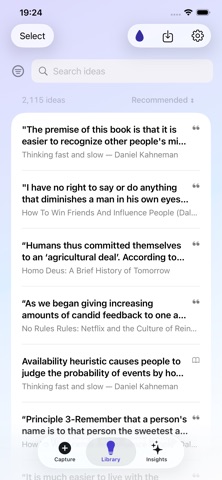
Your library organises itself automatically, tagged across topics you can explore by theme, source, or time. No folders, no manual sorting. Open any idea and Kompound shows you the most similar ideas from your library, found entirely on your device. Daily reminders bring forgotten thoughts back before they fade, and a Rediscover feature surfaces dormant ideas at exactly the right moment.
LET YOUR IDEAS COLLIDE
Tap to generate an insight at any time. Kompound searches your entire library and connects ideas that rarely would have met otherwise. A passage from a book, a podcast note, a forgotten observation, a conversation from months ago. The result is a new insight written specifically for you, often ending with a question or tension worth sitting with.
Save it and it joins your library, feeding the next round of insights. Ideas generate insights. Insights become new ideas. The loop compounds.
PRIVATE BY DESIGN
Everything runs locally on your device. Your ideas stay private and under your control, always. AI is used only when you choose.
Built for curious people who read, listen, watch, discuss, and want to think better.
Nouveautés (v1.48)
- Rediscovery got sharper. Recommended, Rediscover, and daily reminders now rotate across your books. Spend time with one, and it steps aside so something else can surface.
- Reading stays in flow. Open an idea, swipe to the next, tap a source or tag without bouncing back. Tap Library again to go home.
- Start a book or notes extract, lock the phone, and we’ll ping you with Ready to review when it’s time to keep what matters.
- Bug fixes