Description
Fridge2Cal turns the paper calendar on your fridge into events on your iPhone — in about a minute, no typing required.
Snap a photo of any month grid: the family calendar from school, your wall planner, the magnetic one stuck above the kitchen counter. Fridge2Cal reads the dates, times, locations, and event titles, then drops them into a clean review workspace where you can fix anything before they touch your real calendar.
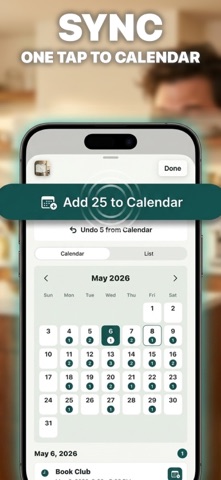
When the drafts look right, one tap pushes them straight into the iOS Calendar. Synced something by mistake? Hit undo and it’s gone — from Fridge2Cal and from your calendar.
WHY FRIDGE2CAL
The best paper calendar in the world is still a paper calendar. School schedules, sports brackets, work shift sheets, recital dates, fridge magnets — they all show up on paper, and they all need to live on your phone. Manually retyping a month’s worth of events is tedious, error-prone, and the reason half of those dates never make it onto your calendar at all.
Fridge2Cal closes that gap. Take a photo, get back a sortable, editable list of events, and ship the ones you want to your iPhone in one tap.
WHAT IT DOES
• SNAP — Camera or photo library. Crop to the month grid so we focus on what matters.
• EXTRACT — Every event we can read becomes an editable draft: title, start, end, location, notes. All-day events and timed events are both supported.
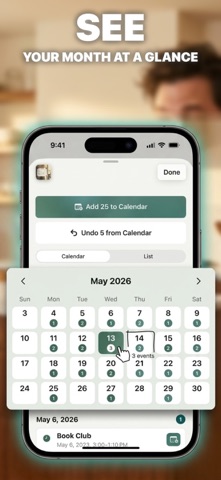
• REVIEW — Switch between Calendar and List views. Tap any draft to fix the title, change the time, add a location, or expand notes. Each one shows the original handwritten source so you can double-check.
• FLAG — Anything ambiguous (smudged times, mystery initials, dates without a year) gets a Needs Review callout instead of being silently guessed.
• DUPLICATE CHECK — We scan your existing calendar inside the date range and warn you when a draft might already be there. No more “doctor’s appointment” showing up twice.
• SYNC — One tap pushes every approved draft to your iOS Calendar. Per-event sync is supported too.
• UNDO — Every synced event can be removed from your calendar with a single tap, even days later. We track the event identifier so we know exactly what to pull back out.
• HISTORY — Past scans live in My Scans with the original photo and event counts. Reopen any scan to keep editing or syncing later.
GREAT FOR
• Parents juggling school, sports, and music schedules
• Students copying syllabus dates and exam weeks
• Shift workers translating printed rosters
• Anyone with a wall planner, fridge magnet calendar, or bullet journal page
• Conference programs, tournament brackets, recital schedules
PAPER GOES IN. CALENDAR COMES OUT.
If you’ve ever stood in front of your fridge taking notes on your phone, you’ll get it.
Terms of Use (EULA): https://www.apple.com/legal/internet-services/itunes/dev/stdeula/
Nouveautés (v2026.09.1)
Fixes