Description
Cmux Remote is a private remote-control client for the cmux terminal multiplexer running on your own computer. Connect through your Tailscale network so your terminal traffic stays between your own devices and does not pass through any developer-controlled server.
WHAT IT IS
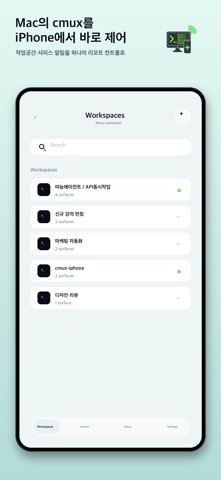
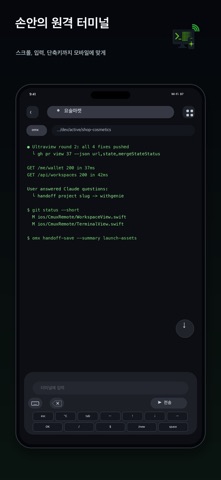
Cmux is a modern terminal multiplexer with workspaces, split surfaces, and integrations for AI coding tools such as Claude Code, Codex, omx, and Cursor. Cmux Remote mirrors the cmux surface you choose, lets you type into it, send keys, switch workspaces, and receive local notifications from a mobile device.
WHO IT IS FOR
This app is for developers who keep long-running coding agents, builds, servers, terminals, or command-line tools active on a personal development machine and want a simple way to check progress or send quick input while away from the desk. It is also useful for people who already use SSH or Tailscale to reach their own computer and want a more focused remote terminal control experience.
HOW IT WORKS
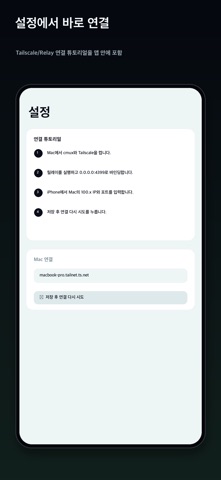
First, install the open-source cmux-relay helper on the computer that runs cmux. Then connect that computer and this device to the same Tailscale tailnet. Open Cmux Remote, enter the computer's Tailscale hostname and relay port, and connect. Your cmux workspaces appear in the app. Choose a surface and start interacting with it.
The relay talks directly to cmux through its local Unix socket. Cmux Remote talks to the relay through a WireGuard-encrypted Tailscale tunnel. There is no hosted backend for terminal data, no analytics pipeline, and no external relay service controlled by the app developer.
FEATURES
Live cmux surface mirroring with ANSI color support.
Korean and CJK character width handling.
Keyboard accessory controls for Esc, Enter, Tab, arrow keys, and Ctrl combinations.
Mouse passthrough support for compatible terminal UIs such as Textual, Bubble Tea, and fzf.
Local notifications for cmux events without an external notification server in version 1.0.
Workspace and surface switching with compact controls.
Pinch-to-zoom terminal font sizing.
Automatic scroll-to-bottom behavior when changing surfaces.
Demo Mode with populated sample data so you can try the interface before setting up a relay.
PRIVACY
Cmux Remote does not include analytics, advertising, or third-party SDK tracking. The bearer token issued by your relay is stored only in secure credential storage on your device. Terminal content and control messages are exchanged only between your device and your own relay over your Tailscale network.
Source code and privacy details are available at:
https://github.com/NewTurn2017/cmux-remote
REQUIREMENTS
A personal computer running cmux 0.64 or later.
The open-source cmux-relay helper installed on that computer.
Both devices connected to the same Tailscale tailnet.
A compatible mobile operating system version for this app.
Cmux Remote is open source under the MIT license. Issues and pull requests are welcome.
Nouveautés (v1.1.1)
cmux Remote 1.0.9 introduces a native tablet workspace designed for wide terminal sessions.
- Uses the full tablet window instead of phone compatibility framing.
- Reorganizes command input, utility actions, and shortcuts into a compact two-row landscape deck.
- Keeps the terminal full-width and gives terminal text a more readable default size on larger screens.
- Provides large touch targets, system text scaling, keyboard focus, Return-key submission, and visible status feedback.
- Keeps shortcut keys usable even while a sent or error message is displayed.
- Preserves the existing phone layout and interaction behavior.
- Supports all four tablet orientations, including during multitasking.