Description
Want to know how many watts your iPhone charges at, and how long until it's full? Is your charger really as fast as the box says? SnapshotWatt shows the real watts live, estimates the time to 80% and 100%, and keeps a record of every charge.
Live watts
・Plug in and see the charging power on a big gauge
・Time to 80% and to 100%
・Before the first measurement, an estimate based on this charger's past records
Dynamic Island and Lock Screen
・Live watts while the app is open
・In the background: the last measured watts and a countdown to 80% and 100%
Chargers and cables
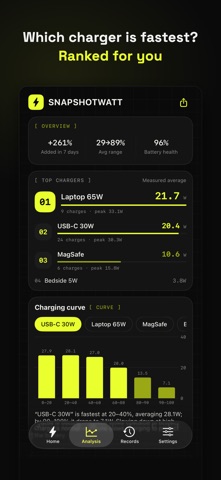
・Name your chargers and cables, then see which one is really the fastest
・Cables limit speed too: find out whether the charger or the cable is the slow one
Records
・Every charge is saved automatically: time, level, average and peak watts, power curve
・Charging time stops when the battery is full, not when you unplug
Analytics
・Charger ranking, last 7 days, battery care tips
・Battery health log: see how fast your battery ages
Bedside Mode
・A dimmed, pure-black screen for charging overnight
・Once full, the screen turns off on its own
Share cards
・Turn a charge or your analytics into an image to share
SnapshotWatt Pro (one-time purchase)
・Full history (free shows the last 14 days)
・Charging curve, weekly totals, charging habits, charger health
・Home Screen and Lock Screen widgets
・Unlimited chargers and cables (free: 5 each)
・Share any analytics section, export CSV
・Anything added to Pro later unlocks too
Speed tests, Dynamic Island and Bedside Mode stay free forever.
About accuracy
iOS only gives apps the battery level in 5% steps, so the watts shown on iPhone are estimated from how fast the level rises and your battery's capacity. They may differ from the true power and are not a lab measurement.
Privacy
No account, no ads, no tracking. Your records stay on your iPhone.
Questions or ideas: contact@compoundwater.app
Terms of Use (Apple standard EULA):
https://www.apple.com/legal/internet-services/itunes/dev/stdeula/
Terms of Service: https://compoundwater.app/snapshotwatt/en/terms.html
Privacy Policy: https://compoundwater.app/snapshotwatt/en/privacy.html
Nouveautés (v1.0.2)
• Records without watts now explain why: if the battery level rose while the app wasn’t on screen, you’ll see that instead of “too short”
• If you plug in, leave the app and only come back after charging, the app now tells you that part couldn’t be measured
• Clearer onboarding: keep the app open for about 5–10 minutes to get a measured wattage