Description
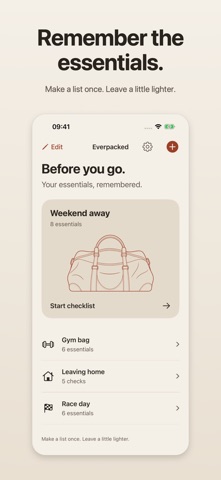
Make a list once. Leave a little lighter.
Everpacked helps you remember the essentials for weekends away, the gym, leaving home and the days you repeat.
Start a fresh checklist from a reusable list whenever you need it. Tick items as they go in the bag, undo a slip with one tap, and leave anytime: your progress is still there when you come back. When everything is ready, All set finishes the checklist and your original list stays ready for next time.
• Reusable lists with notes, item icons and your own order
• Choose a list icon or one of eight original drawings
• Saved checklist progress
• Edit right inside an open checklist; checks stay with their items
• Hide checked items automatically on lists of more than eight essentials, always, or not at all
• Tap the bell to set, change or remove one optional reminder; it names the list, never its items
• Home Screen widgets for list progress and what’s left
• Sand, Porcelain, Blush, Midnight and Automatic—all included
• Original, Pink and Dark app icons
• Gentle haptics you can turn off
Reminders are ordinary iPhone notifications, not wake-up alarms. Focus and notification settings can affect delivery. Start over clears checks without leaving your checklist; All set finishes it for next time.
Private by design: your lists stay on your iPhone. No account, no ads, no analytics, no server.
Everpacked is free. If it helps, you can leave an optional one-time tip in Settings through an Apple In-App Purchase. Tips unlock nothing; every feature stays free.
Nouveautés (v1.1)
A little more you.
• Blush, a new look, joins Sand, Porcelain, Midnight and Automatic.
• Home Screen widgets show a list’s progress and what’s left. Touch and hold a widget, choose Edit Widget, then select its List and Style.
• Choose Original, Pink or Dark app icons in Settings.
• Leave an optional one-time tip in Settings if Everpacked helps. Everything stays free.