
Navigation
TripRoad Rally
par Burotica
$5.99
Prix actuel — pas de promo en cours
Captures d'écran
Description
TripRoad Rally is indispensable for navigation Rally Road Book.regularity rally
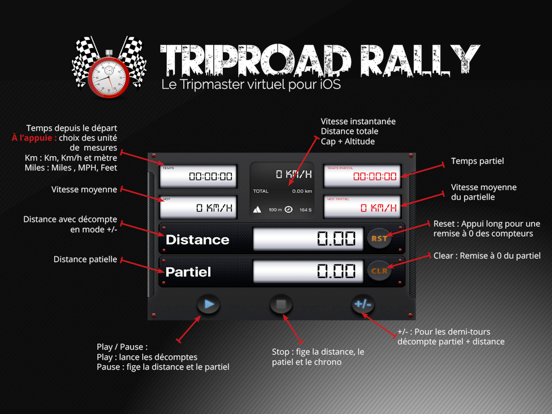
You can choose Miles or KPH by clicking on the section Time
Features:
- English interface
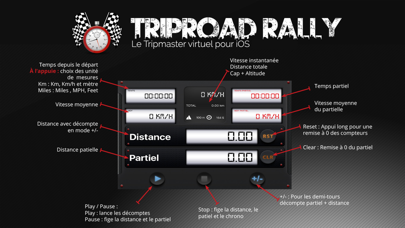
- Speed Kph or Miles / Elevation M or Ft
- Heading
- Elevation
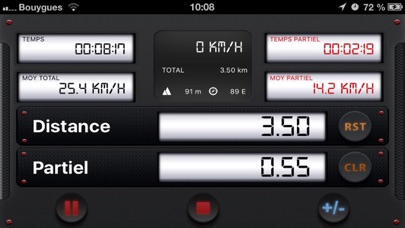
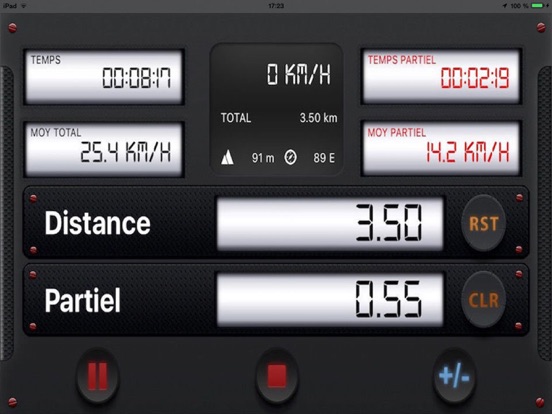
- Partial Distance Miles/km
- The total distance Miles/km
- + / - On partial distance.
- Pause Mode
- Display the total distance
- Display of the total travel time
- Display the total average speed
- Display of the partial travel time
- Display the partial average speed
- "Play" button to start recording the course
- Possibility of stopping the course or to take a break.
- Reset by Long press (2s) on the RST button to avoid accidental erasure.
TripRoad Rally continues to use the GPS in the background when you exit the application to continue to save your travel time and distance.
Note:
Continued use of GPS running in the background can Dramatically Decrease battery life.
You can choose Miles or KPH by clicking on the section Time
Features:
- English interface
- Speed Kph or Miles / Elevation M or Ft
- Heading
- Elevation
- Partial Distance Miles/km
- The total distance Miles/km
- + / - On partial distance.
- Pause Mode
- Display the total distance
- Display of the total travel time
- Display the total average speed
- Display of the partial travel time
- Display the partial average speed
- "Play" button to start recording the course
- Possibility of stopping the course or to take a break.
- Reset by Long press (2s) on the RST button to avoid accidental erasure.
TripRoad Rally continues to use the GPS in the background when you exit the application to continue to save your travel time and distance.
Note:
Continued use of GPS running in the background can Dramatically Decrease battery life.
Nouveautés (v1.4)
NEW FEATURES
• Full iOS 18 support
• Optimized for the new iPhone 16 Pro
• Improved GPS accuracy
Improved GPS accuracy
• 3D distance calculation: The distance traveled now takes into account elevation changes and variations for a more accurate measurement
• Smart GPS filtering: Automatically removes inaccurate GPS readings (>50m) and unrealistic distance spikes to prevent false measurements
• Altitude validation: Verifies the reliability of altitude data before use
Optimized magnetic heading
• Heading calculation corrected according to device orientation (landscape left/right)
• Displays cardinal directions (N, NE, E, SE, S, SW, W, NW)
• Improved compatibility with iOS 13+ for orientation detection
Overall stability
• Fixed distance jumps when resuming from a pause
• Better handling of background location updates
• Optimized power consumption Battery life with GPS filtering
Bug fixes
• Fixed incorrect distance issues after pausing
• Improved handling of location errors
• Improved accuracy of average speed calculation
• Full iOS 18 support
• Optimized for the new iPhone 16 Pro
• Improved GPS accuracy
Improved GPS accuracy
• 3D distance calculation: The distance traveled now takes into account elevation changes and variations for a more accurate measurement
• Smart GPS filtering: Automatically removes inaccurate GPS readings (>50m) and unrealistic distance spikes to prevent false measurements
• Altitude validation: Verifies the reliability of altitude data before use
Optimized magnetic heading
• Heading calculation corrected according to device orientation (landscape left/right)
• Displays cardinal directions (N, NE, E, SE, S, SW, W, NW)
• Improved compatibility with iOS 13+ for orientation detection
Overall stability
• Fixed distance jumps when resuming from a pause
• Better handling of background location updates
• Optimized power consumption Battery life with GPS filtering
Bug fixes
• Fixed incorrect distance issues after pausing
• Improved handling of location errors
• Improved accuracy of average speed calculation