Description
EMOM, AMRAP, Tabata, Custom Intervals. The gym clock on your wall, but on your phone.
No ads. No recipes. No workout videos. No social feed. No account to create. No subscription to forget about. Just a gym clock that does one thing extremely well.
Designed to look and feel like the LED timers mounted on gym walls, BoxClock turns your iPhone or iPad into the clock you already know how to use. Glance up, read the time, get back to work.
7 TIMER MODES
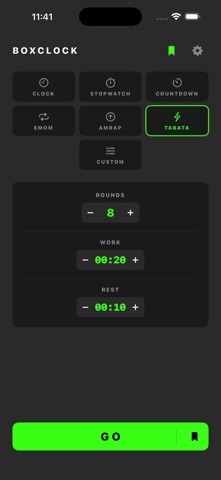
- EMOM (Every Minute on the Minute) — Set your rounds and interval length. Audio beeps at every minute.
- AMRAP (As Many Rounds as Possible) — Countdown timer with a swipe-up round counter.
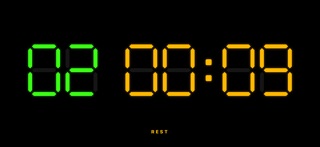
- Tabata — Classic 20/10 or fully configurable work/rest intervals. Red for work, amber for rest.
- Custom Intervals — Configure sets, rounds, work time, rest time, and rest between sets. Your workout, your rules.
- Countdown — Set a duration and go. Big LED digits count down to zero.
- Stopwatch — Count up from zero. Simple and reliable.
- Clock — Real-time display in 12h or 24h format. Mount your phone on the wall.
LIVE ACTIVITIES ON THE LOCK SCREEN
- See your timer ticking on the Lock Screen and Dynamic Island
- Round count, phase (WORK / REST), and big digits — no need to unlock
- Pre-countdown "GET READY" view so you never miss the start
- Pause directly from the Lock Screen and resume without opening the app
LOOKS LIKE A REAL GYM CLOCK
- 7-segment LED digits with visible unlit segment traces
- Green digits for rounds, red for time, amber for rest
- Black background, high contrast, readable from across the room
- Landscape display fills your screen edge to edge
AUDIO CUES
- 3-2-1 beeps before every workout starts
- Beeps at work/rest transitions and round changes
- Alert when the workout is done
- Mixes with Spotify, Apple Podcasts, and your own music — no pausing your playlist
- Keeps playing with the phone face-down, in background, or with the screen locked
- Plays even when your phone is on silent
SAVE YOUR WORKOUTS
- Bookmark up to 10 timer configurations
- Tap a saved workout and go — no re-entering settings
- Each mode remembers its own settings between sessions
CONFIGURABLE START COUNTDOWN
- Set your pre-workout countdown anywhere from 0 to 60 seconds
- Set it to 0 to skip the countdown entirely and start instantly
JUST A CLOCK
- Screen stays on during active timers
- No dimming, no interruptions
- Works on iPhone and iPad
- No account. No ads. No tracking. No bloat.
PRICING
Clock, Stopwatch, and Countdown are free forever. Unlock EMOM, AMRAP, Tabata, Custom Intervals, saved workouts, and the configurable countdown for $4.99. One time. No subscription. No "premium tier". Pay once, train forever.
BoxClock is made by Tiny Delights. One app. One job. Done well.
Nouveautés (v2.0.1)
Now available in Portuguese and Spanish — for Portugal, Brazil, Spain, and Mexico.