Description
Make a chess video in 30 seconds.
Play a chess game inside Tempo64, or paste a game you've already played somewhere else, and the app turns it into a short video ready for TikTok, Instagram, YouTube, or wherever you post.
The sounds are what make it. Every check, capture, and checkmate gets its own sound effect — punchy, dramatic, sometimes goofy on purpose. Castling crashes. Captures chomp. Checkmate gets the slow, deep ring-out. Pick your favorites from a menu of ten.
TRAIN WITH PUZZLES
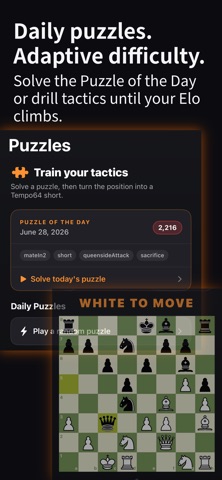
Solve the Puzzle of the Day or play an endless queue of tactics from Lichess's database. The difficulty adjusts to your level — your Elo rating updates after every puzzle. Solve a position you like? Turn it into a video on the spot.
PLAY WITHOUT LEAVING THE APP
- Play against the computer. Five difficulty levels, from Easy to Brutal. It "thinks" for a few seconds before each move so it feels like a real opponent, not an instant calculator.
- Pass the phone to a friend. Two humans, one board. The board flips between turns so whoever's playing always sees their pieces at the bottom.
- Play online with a friend. Create a game, share the 6-letter code, your friend types it in. No accounts. Free.
ALREADY HAVE A GAME YOU PLAYED?
Paste a chess.com link and Tempo64 looks up your moves automatically. Lichess works too.
MAKE IT YOURS
- Six board looks. Ten sound effects you can mix and match. Five pacing speeds so quiet stretches don't drag.
- A "climax teaser" plays your most dramatic move first — so people scrolling stop to watch.
- Big captures (a knight taking a queen, that kind of moment) splice in short cinematic clips with their own audio. (Studio.)
- Record a voice reaction on any move and Tempo64 weaves it in over the board.
- Studio subscribers can film a face-cam reaction that floats over the board in a little circle bubble.
CAPTIONS WRITTEN FOR YOU
Apple Intelligence (the AI built into your iPhone) suggests a punchy headline and a short caption for your post. Don't like it? Tap Regenerate. Copy. Post.
KNOW HOW GOOD YOUR MOVES WERE
Tempo64 grades every move you played using the world's strongest chess engine. Brilliant moves and blunders each get their own dramatic sound effect in your video. A small bar at the side of the board fills up to show who's winning.
GAME REVIEW
Tap the chart icon on any game. Walk every move on an interactive board, see a best-move arrow from the engine, and trace the advantage curve on a scrollable sparkline. Blunders are flagged — jump straight to where things went wrong. Free: one review per day. Studio: unlimited.
WIDGETS
Add a Tempo64 widget to your home screen. Small shows your daily puzzle streak. Medium adds today's board position. Large shows the full board so you can actually see the pieces. Streak updates every time you solve a puzzle.
YOUR GAME HISTORY
Every game you play against a bot and every puzzle you solve saves automatically to your library. Come back an hour later or a week later, tap the entry, and turn it into a video. Your last 30 days of games and last 30 puzzles are always there. Two tabs keep everything organized: Games & Puzzles on one side, rendered Videos on the other.
STUDIO (PREMIUM)
- Remove the Tempo64 watermark from every video
- Unlimited face-cam commentary (free users get one clip per game)
- Unlimited voice commentary (free users get one clip per game)
- Unlimited Game Review (free users get one per day)
- Unlimited puzzles (free users get 5 per day)
- Hints for both players in bot games and pass-and-play
- A gold app icon
Monthly or yearly. Cancel any time in Settings.
PRIVATE BY DEFAULT
Everything happens on your phone. Your videos, your voice clips, your captions — none of it goes through a server we run. Online multiplayer uses Apple's iCloud to sync moves between you and your friend. No tracking. No analytics.
Terms of Use (EULA): https://www.apple.com/legal/internet-services/itunes/dev/stdeula/
Nouveautés (v3.7)
v3.7 — Move history + review during play, online draw offers, commentary reference card.
PLAY A GAME
Three new things across every playable surface — Play a Bot, Pass and Play, Online with a Friend, and Puzzles. Drag and drop is here: pull a piece with your finger to move it, or keep using tap-and-tap if you prefer — both work. Haptic feedback confirms every pickup and commit. A scrubbable move list sits at the top of the board with prev / next arrows so you can step back through the game mid-match without losing your spot. Tap any move to jump to that position; the board becomes read-only until you swipe forward to the live frame or the next move commits. When the game ends, tap "See analysis" on the finish sheet to drop straight into Game Review — eval sparkline, blunders flagged, best-move arrows on every move. Free tier: one review per day (same daily gate that already applies elsewhere). Studio: unlimited.
ONLINE PLAY
Playing a friend online? You can now offer a draw. Tap Offer Draw, your friend gets a prompt on their side, and if they accept the game ends ½–½ for both of you. Declined offers clear themselves after a few seconds so you can try again later. Friend invite links also open the app more reliably now — even on the first tap after a fresh install.
COMMENTARY
When you open the recording sheet on any move, a reference card now shows the move in plain English — "Black's bishop captured White's queen on d1" — so you always know exactly what to talk about before you hit record. If engine analysis has run, a quality badge (!! / ! / ? / ??) appears in the corner.
POLISH
- The captured-pieces row wraps to a second line in long endgames instead of pushing the board around.
- The board no longer jumps a few pixels between "your turn" and "bot is thinking" in Play a Bot and Online Friend games.
- The Start Game button on the Play a Bot setup screen stays pinned to the bottom as you scroll through difficulty and think-time settings.