Description
ErgoCam is a real-time posture coach that uses your iPhone's front camera to spot the bad habits that quietly wreck your back, neck, and shoulders — before the pain shows up.
THREE MODES, ONE APP
• Phone:catches tech neck (chin tucked toward your collar), screens held too close, and head-tilt strain while you scroll.
• Desk: watches your shoulders, chest, and chin in real time. Alerts the moment you slump toward the screen.
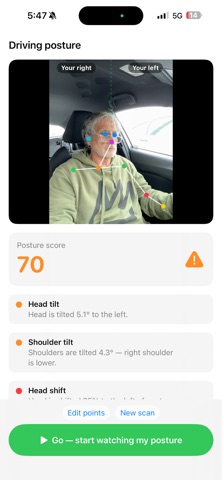
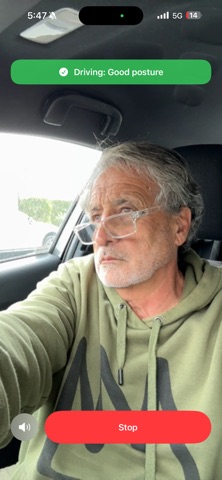
• Driving: mount the phone on the dash. ErgoCam watches for drowsiness (eye closure, head dropping) and slumped driving posture. Audio-only alerts keep your eyes on the road.
CALIBRATED TO YOU
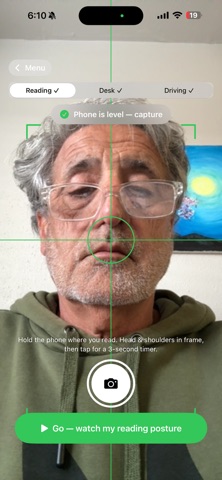
• One-tap calibrate per mode — phone, desk, and driving each remember their own baseline, so the app never fires "bad posture" on a healthy variant.
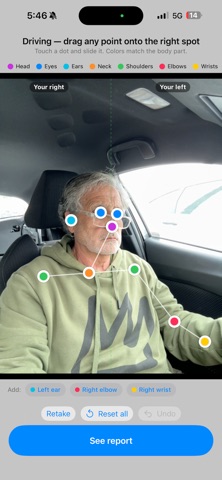
• Fine-tune by tapping your shoulders, chin, and chest on a frozen frame. The app uses YOUR anatomy as the slouch reference, not a generic model.
• Driving uses a five-point side profile (ear, neck, shoulder, side of upper back, side of lower back) so it understands posture from a dashboard angle.
REAL CONTROLS
• On/off switches for tech neck and head-tilt detection if a detector keeps firing on a posture you consider fine.
• A "back straight" sensitivity slider that scales slouch, forward-head, and chest-gap alerts together.
• Sound + haptic, visual flash banner, or silent visual-only mode for meetings.
• Reminder pings if you want a gentle check-in even when ErgoCam isn't on screen.
DESIGNED TO ACTUALLY STAY ON
• Won't go dark — ErgoCam keeps the screen awake while it's watching, so your auto-lock doesn't quietly shut posture coaching off.
PRIVATE BY DESIGN
• Every Vision computation happens on your iPhone. Camera frames never leave the device — no cloud upload, no account required.
WHO IT'S FOR
• Remote workers who slump into their laptops by 4 PM.
• Anyone who scrolls in bed and wonders why their neck hurts.
• Drivers without built-in driver-monitoring — especially long-haul, older drivers, and parents of new drivers.
• People who've tried posture-correcting straps and want a smarter, less annoying nudge.
Sit up. Look up. Drive safe.
• Chin & neck position tracking
Helps identify forward-head posture and neck compression.
• Eye fatigue & drowsiness detection
Monitors eyelid openness and fatigue indicators during long sessions.
• Smart wellness reminders
Receive posture corrections, stretch reminders, and focus breaks.
• Privacy-first design
All processing happens locally on your device. No cloud tracking. No recordings uploaded.
• Lightweight & automatic
Runs quietly in the background while you work.
IDEAL FOR
• Remote workers
• Students
• Developers
• Designers
• Gamers
• Office professionals
• Anyone spending long hours in front of a screen
WHY ERGOCAM?
Most people do not realize how often they slouch, lean forward, or strain their neck until discomfort appears. ErgoCam brings real-time awareness to your posture using the camera already built into your Mac.
Better posture starts with awareness.
ErgoCam — See your posture. Improve your habits.
Nouveautés (v1.1.5)
What's New in 1.1.5
Smarter, more reliable posture detection
• ErgoCam now catches more of the postures that actually strain your neck and
back — head dropped forward, head tilted back, and head cocked to one side —
and it's far more consistent from one position to the next.
• New: it detects when your head sinks down between your shoulders (your neck
disappears from view) and reminds you to sit tall. Works in every position —
Reading, Desk, and Driving.
• Posture is now judged on what the camera actually sees rather than leaning
on your saved calibration, so a level, healthy posture no longer gets flagged
by mistake — and a genuinely poor one no longer slips through as "Good."
• When the camera can't get a clear read of you, ErgoCam now says "Looking for
you…" instead of showing a false "Good posture."
See that it's working
• Live tracking dots now stay on your face while ErgoCam is watching you —
green when your posture is good, red when something needs fixing.
Easier, clearer calibration
• After ErgoCam auto-places your posture points, a note reminds you that you
can drag any point to fine-tune it.
• A long buzz lets you know the moment a capture finishes — handy when your
phone is propped to the side for Desk or Driving and you're looking away. Just
turn back and adjust.
• When you add a point by hand, it now flashes until you drag it into place,
so you always know which one to position.
Thanks for using ErgoCam. Keep sitting tall!