Description
Looking for a free video editor that’s powerful, fast, and beginner-friendly? VDIT is a mobile video editing app designed for creators who want full control over their videos, from cut editing to professional-level effects. Whether you're making Reels, Shorts, YouTube videos, or daily vlogs, VDIT helps you create, style, and export your content in high quality.
No need to pay upfront—VDIT gives you powerful free tools to get started. Try our Quick Start feature and create stunning, viral videos with just one tap! As your editing skills grow, you can explore premium features at your own pace.
Create faster with smart AI editing tools
Even if you've never used AI tools before, VDIT helps you edit faster with smart automation.
- Create fast, accurate AI Auto captions without privacy concerns.
- Simply add video clips to templates, and your video is created automatically.
- Instantly remove backgrounds with AI.
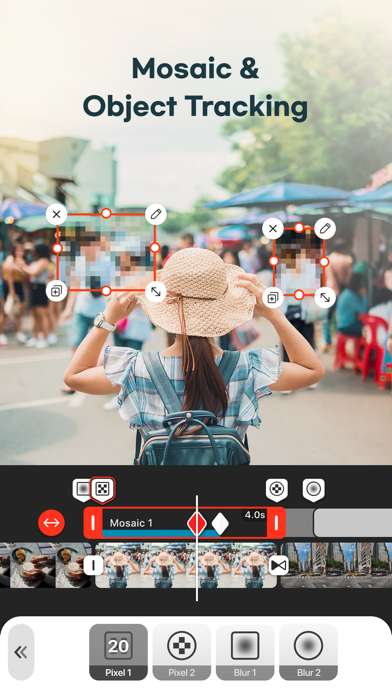
- Auto-track moving objects to pin text, stickers, and PIP layers.
- Convert text into natural voiceovers with built-in text-to-speech (TTS).
- Reduce background noise in audio and video for clearer results.
Add cinematic effects and stylish subtitles
- Apply 160+ aesthetic filters and visual effects.
- Import your own LUTs to apply custom color styles.
- Add personality with subtitle templates, drawing tools, and shape overlays.
- Great for daily vlogs, travel content, or aesthetic reels with emotional music and captions.
Edit seamlessly across iPhone and iPad
- Easily edit subtitles, music, and overlays with a touch-friendly interface.
- Boost your workflow with undo/redo and iPad keyboard shortcuts.
- Share your projects across devices anytime.
Style your video with text, subtitles, and stickers
You can easily add and customize subtitles to match your style.
- Choose from 140+ subtitle and title presets.
- Use handwritten fonts, animated text, and motion effects.
- Automatically track and blur faces with AI Face Detection Blur.
- Use motion blur, dust, and Blur Invert to create cinematic edits.
Enhance your video with royalty-free music and sound effects
- 400+ royalty-free background music tracks and sound effects included.
- Extract audio from video, record voice, or import your own music.
- Automatically adjust music to match your video’s duration.
- Export audio from your video and save it in M4A, MP3, or WAV with preferred quality.
Fine-tune every clip with advanced editing features
- Trim, split, reverse, or control speed precisely.
- Add freeze frames, cinematic pan/zoom (Ken Burns), and transitions.
- Overlay videos, photos, GIFs, and Live Photos.
- Create dynamic edits with keyframes, speed curves, and background blur.
Export and share your videos in high quality
Perfect for social media, business, and marketing, with no watermark on your exports.
- Choose from SD, HD, QHD, FHD, or 4K output at 24–60 FPS.
- Edit fast with preset ratios for Reels, Shorts, TikTok, and YouTube.
- Save as video, GIF, or still image.
- Customize codec, bitrate, HDR settings for professional results.
Unlock all premium features with VDIT PRO
- Enjoy full access with a monthly or annual subscription.
- You can cancel anytime, and your premium features will stay active until your current billing period ends.
- You can turn off auto-renewal anytime in iTunes account settings.
- Your plan stays active until the end of the current billing period. Partial refunds are not available.
VDIT is a video editing app that grows with you.Need help figuring out how to use AI background removal or text editing?
Visit [Settings > Help] in the app or contact us at vdit@imgbase.me. Turn everyday moments into unforgettable memories with VDIT.
Instagram: https://www.instagram.com/vditapp
Terms of Use: https://www.imgbase.me/vdit/terms/termsofuse.html
What's new (v4.0.2)
VDIT home screen has a fresh new look.
- You can now launch your most-used features directly from the home screen for more convenient editing.
Editing features became more powerful.
- AI Face Detection Blur: Automatically track and blur faces without manual work
- Blur Invert: Keep your subject clear while naturally blurring the background
- Enhanced Text Editing: Style text with partial colors, decorations, and advanced alignment
- Clip Motion Easing: Make movements smoother and more natural
- 7 New Birthday and Split Templates
VDIT is continuously improving to provide a better editing experience and stable service. If you have any feedback or issues, please contact us anytime via [VDIT Help > Contact Us].