Description
Altitude Compass is a focused, ad-free compass and altimeter for hiking, camping, and travel records. Core compass and altitude features are free, while Full Version adds an iPhone watermark camera and more personalization.
Free core features
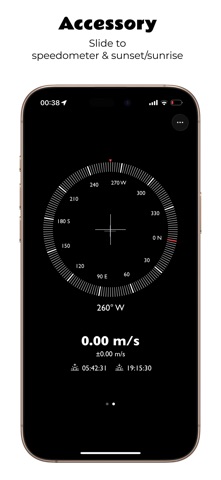
• View heading, altitude, barometric pressure, coordinates, and nearby addresses
• Switch the altitude source between GPS information and the device altimeter when supported
• Check level, speed, sunrise, and sunset information
• Choose from multiple compass dials, altitude display themes, light or dark appearance, fonts, and units
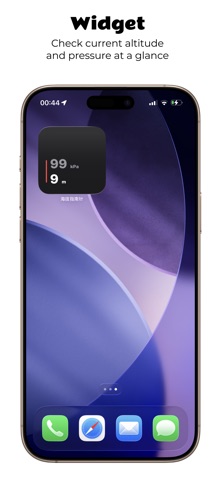
• View altitude with Home Screen, Lock Screen, and StandBy widgets
Full Version
Choose Full Version when you want to record outdoor photos or further personalize Altitude Display:
• High-quality iPhone watermark camera: capture directly with the iPhone camera and apply watermarks to high-resolution camera output rather than a screen or viewfinder capture
• Photo information preservation: retain capture time, orientation, location, and other photo information whenever possible for continued recognition and organization in Photos and other apps
• Custom watermark content: record altitude, pressure, coordinates, address, direction, time, and notes, with control over each field's visibility and order
• HDR watermarked photos: supported iPhones can preserve richer highlight and shadow detail, with an option to save a more widely compatible JPEG instead
• Custom background colors for Altitude Display
You can try Full Version free for 3 days. The trial does not renew or charge automatically. A one-time in-app purchase permanently unlocks Full Version. There are no subscriptions. Customers who previously purchased the paid app automatically keep Full Version access and do not need to purchase it again.
Network and privacy
Core features such as heading, sensor altitude, and barometric pressure generally work offline. Nearby addresses, maps, in-app purchases, and purchase restoration require a network connection. The app contains no ads and does not collect personal data.
Permissions
• Location: GPS altitude, coordinates, speed, sunrise and sunset, maps, and addresses
• Motion & Fitness: pressure and altimeter readings on supported devices
• Camera and Photos: only when capturing and saving watermarked photos
Device capabilities and readings may vary with hardware, system version, environment, and location signal. HDR watermarked photos require iPhone 12 or later with iOS 17 or later. The watermark camera is not available on iPad.
What's new (v3.8.0)
Improved the watermark camera layout and zoom experience. On versions before iOS 26, you can now choose between Glass and Classic app icons.