Description
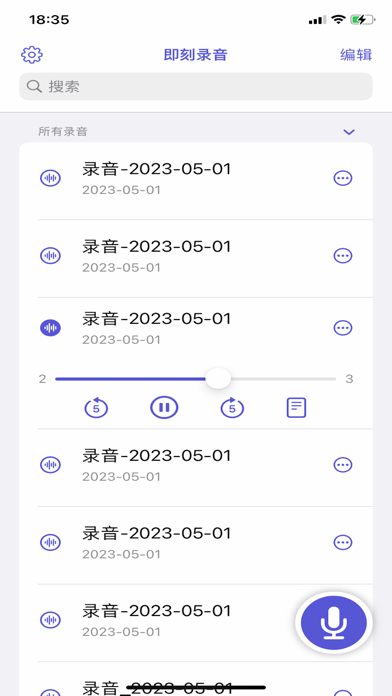
This intelligent real-time transcription tool is designed for local voice-to-text conversion without network support. Combined with advanced speech recognition technology, it can accurately and efficiently convert speech to text on the device. The following are the main features and functions of the application:
1. **Real-time transcription**: Seamlessly capture and transcribe voice content, support instant display of transcribed text, and ensure that users can easily obtain text records in any scenario.
2. **No network support**: Completely rely on local device processing, no network connection is required, to ensure data privacy and security, and ensure that user information is not uploaded to the cloud.
3. **Accurate recognition**: Using advanced speech recognition algorithms, it can maintain high recognition accuracy even in noisy environments, helping users to quickly record clear text content.
4. **Support multi-scenario applications**: Whether it is meeting records, class notes, interview transcriptions, or daily conversations, it can provide efficient text recording functions, suitable for various demand scenarios.
5. **Privacy protection**: All voice and text data are stored on the local device and not uploaded to the cloud, ensuring the privacy and security of users.
6. **Ease of use**: With a simple and intuitive operation interface, users can quickly start recording and transcribing without complicated settings, improving the convenience of work and life.
This app perfectly combines voice-to-text with privacy protection, helping users to record high-quality text anytime, anywhere, improving work efficiency and convenience.
What's new (v1.1.9)
What's New
Recording Search
Quickly search recordings by title and content to easily find what you need
Import Audio
Import external audio files with automatic transcription and save to your recording list
Re-transcribe
Added re-transcription feature in detail view to reprocess recordings anytime
Edit Management
New edit mode with swipe-to-delete and batch delete functionality
Bottom Recording Button
Added prominent recording button at the bottom of the home screen for easier access
Improvements
Transcription Performance
Improved transcription speed and stability
UI Optimization
Unified theme colors with optimized button styles and gradient effects
Dark Mode Support
Enhanced icon and interface display in dark mode
Localization
Improved multi-language translations for better international experience
Compatibility
Fixed iOS 15 compatibility issues to support more devices
Bug Fixes
Fixed potential crash when saving recordings
Fixed issue where real-time transcription was not working
Fixed low recording volume and audio playback conflicts
Fixed crash in edit mode
Fixed playback time formatting display issue