Back to deals
Auto Scroll | Web

Lifestyle

$0.99

Auto Scroll | Web

by Paran

3.7 (6) v1.3.3 4 MB Universal 4+

Description

Give your hand a little break.
With AutoScroll, enjoy news, blogs, webtoons,
and even Reels and Shorts more comfortably.

AutoScroll | Web is a Safari extension
that automatically scrolls web pages,
so you do not have to keep swiping the screen.

Perfect for reading news, blogs, forums, articles, and webtoons.
And with Swipe Mode, you can also move through
short-form video feeds like Reels and Shorts more comfortably.
Reduce hand fatigue and stay in the flow.

Key Features (Included)
• Auto Scroll (Safari extension)
• Swipe Mode (supports vertical feeds like Reels and Shorts)
• Speed control
• Timer control
• Pause/Resume anytime
• iPhone/iPad: double-tap to start/stop
• Show +/- speed buttons in the pop-up (On/Off in Settings)
• No unnecessary background activity — lightweight and fast

Extra Features (Optional)
• iPhone/iPad: triple-tap
• Keep scrolling even when touching the screen
• End-of-page control & infinite repeat
• On-screen play/stop and speed +/- buttons
• Easy swipe button
• Scroll direction reverse button
• Keep screen awake
• Apple Watch remote control
(In-App Purchase)

Privacy
• 100% local operation
• No browsing or usage history is collected or transmitted

Device Support
• Supports iPhone, iPad, Mac, and Apple Watch
• (double-tap/triple-tap/keep screen awake) are only available on iPhone/iPad.

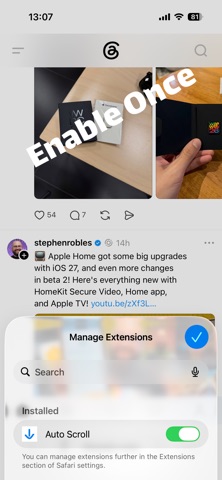
[Enable Safari Extension]

iPhone / iPad
Settings → Safari → Extensions → AutoScroll | Web → Turn On

macOS
Safari → Settings (⌘,) → Extensions → Check AutoScroll | Web → Allow permissions

Notes
On some websites, or depending on Safari system behavior,
scrolling or swiping may stop or not work.
If that happens, fully quit Safari and relaunch it —
that fixes it in most cases.

- Contact: help@paran.app
- Terms of Use: https://paran.app/auto-scroll/terms
- Privacy Policy: https://paran.app/privacy-policy

What's new (v1.3.3)

Fixed bugs and improved features.
Pro users can now drag and move buttons on web pages.
Please send suggestions or feedback to help@paran.app.