Back to deals
Dash for Tesla

Utilities

$2.99

Dash for Tesla

by 豪 陈

4.5 (2) v1.7.1 42 MB Universal 4+

Description

Dash for Tesla is a Bluetooth‑based digital dashboard designed for Tesla owners.
No login, no cloud authorization, and no additional hardware box are required. With just your phone and Bluetooth, you can access vehicle speed and other officially supported data and display them in multiple dashboard styles.

Core Highlights

No login · No cloud auth · No extra box
You don’t need to enter your Tesla account, request remote API tokens, or install any OBD/communication box. As long as your vehicle supports Bluetooth key capabilities, you can connect locally and display data.
Local Bluetooth connection
Uses the vehicle’s officially supported Bluetooth capabilities to connect locally and show basic information such as speed and selected vehicle status on your phone.
Dashboard‑first experience
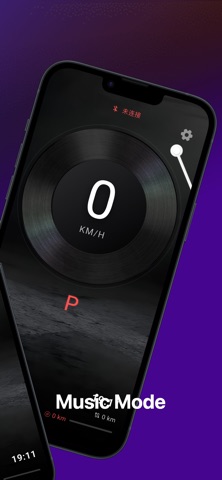
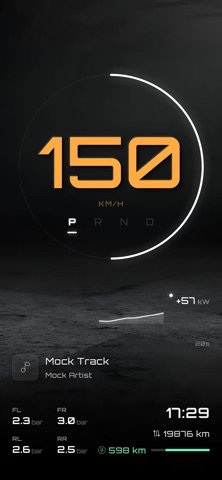
The core of the app is a digital cluster: it focuses on key driving information like speed, so you can read what matters at a glance.
Multiple themes and backgrounds
Choose from different dashboard backgrounds and color themes to match your personal style and interior mood.
Local‑first, fast response
Communication is local over BLE, not dependent on cloud connectivity, which means faster response and better stability even in poor or no network conditions.
Privacy & Security

No account registration is required, and we do not build a cloud profile based on your personal identity.
Vehicle data is primarily processed locally on your device rather than stored long‑term on our own servers.
Permissions such as Bluetooth and Location are used only to enable local communication with the vehicle and to support dashboard features.
Ideal for drivers who

Want a simple, focused digital speedometer and status dashboard.
Prefer not to share Tesla account credentials or rely on cloud‑based remote control.
Don’t want to install extra hardware boxes and just use the phone plus the vehicle itself.
Important Notice
Dash for Tesla is an independent third‑party tool and is not affiliated with, endorsed by, or officially connected to Tesla, Inc. or any of its subsidiaries.
The app only displays data based on the vehicle’s officially supported Bluetooth capabilities and does not perform any modification or flashing of the vehicle.
All Tesla‑related trademarks and brand names are the property of their respective owners and are used only for descriptive purposes.

What's new (v1.7.1)

【Fixes & Improvements】
Optimized the UI of the Default, Music, Minimalist, and HUD watch faces for a more reasonable layout and visual design.
Enhanced the interaction flow for setting watch face backgrounds, making customization easier.
Refined the visual style of turn signal indicators for clearer and more prominent alerts.
Conducted multiple detail optimizations and bug fixes to improve system stability.
【Performance Optimizations】
Added a real-time data source status display, allowing users to intuitively view the connection and signal quality of Bluetooth, vehicle modules, and GPS.
【New Features】
Multi-Source Data Fusion Driving: Added support for free combination and switching of multiple data sources (Bluetooth, vehicle modules, GPS) to adapt to a wider range of vehicle models.
Professional Information Display: Added altitude, atmospheric pressure information, and a real-time speed-power dynamic curve to the default watch face.
Efficient Watch Face Management:
Added a “Quick Switch” entry on the watch face interface for rapid browsing and switching between watch faces.
Introduced the “Watch Face Library” feature, providing centralized management and categorized browsing of watch faces.
Personalized Startup Experience: Added a “Startup Show” feature, displaying personalized animations or information when the app launches.
Enhanced Music Experience: The music watch face now automatically fetches and syncs the corresponding album artwork when switching music playback sources.