Description
Most recording apps feel like software. Reel feels like hardware.
Reel is a multitrack tape-style field recorder in your pocket. Record your hardware jams, capture ideas in the rehearsal room, a live gig, collect sounds out in the field, digitise your vinyl or catch the moment inspiration hits. Connect your interface, hit record and capture it before it's gone.
The disc spins. The transport clicks. Rewind ramps up the way tape actually does. Every interaction is physical, immediate, satisfying. Less time looking, more time listening.
THE DISC.
The large central reel is the heart of the app. Drag to scrub. Flick it and it spins with real momentum. Scratch it and it sounds like tape pulled across a head, wind and all. Nothing else on the App Store feels like this.
RECORDING.
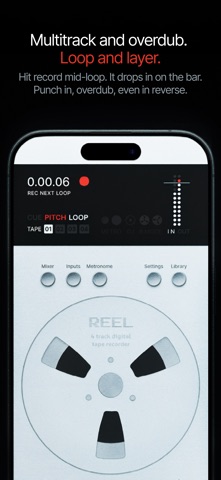
This is what Reel is for. Record one track or all four at once. Punch in a fix, overdub on top, record in reverse or let a take wait and start at your first sound. Count in with the click or roll free with no grid.
QUICK RECORD.
Inspiration doesn't wait. Press the Action Button, tap the Control Center button or ask Siri and Reel opens already rolling.
FOUR TRACKS. REAL WORKFLOW.
Reel works like tape, not a DAW. Capture your whole setup in one take, up to four tracks at once from a multichannel interface. Then work the tape one track at a time: punch in a fix or overdub a new part without touching the rest. When all four are full, bounce down to one and keep layering. Reel is tape the way it works, not tape the way it sounds: the source lands clean and professional grade, ready for your DAW, sampler or a real tape machine.
THE LOOPER.
Set a length in bars and the take ends itself on the bar and loops. Hit record mid-loop and the next take waits for the top, records one pass and drops in. Build a song one layer at a time.
TEMPO AND BARS.
A metronome with any time signature, count-in, a visual beat and a bars timeline. The click follows the tape, even when you scrub.
CUE POINTS.
Drop a marker anywhere and jump back instantly. Name, reorder and preview them or play them from pads on your controller.
THE MIXER.
The mixer slides up over the reel. Per-track meters, level, pan, mute, solo, monitoring and input gain for record levels. Real fader feel, with haptics. Mixes save per project and print on export.
PITCH AND SPEED.
Speed and pitch move together, like tape. Lock the disc anywhere from quarter speed to four times or snap to real semitones. Record over a sped-up take, bring it back down and your new part plays deep and slow. It plays backwards too.
MASTER RECORD.
Print your performance as you play it. Arm it and it starts at the first sound: every stop, scrub and pitch move goes down live to its own recording. Resample the master straight onto a track and keep building.
MIDI AND ABLETON LINK.
Start, stop and record in sync with drum machines, samplers and grooveboxes. Map any MIDI controller to Reel's controls over USB or Bluetooth. With Ableton Link, Reel shares tempo and downbeat with Live and every Link app on your network.
WORKS WITH YOUR GEAR.
Plug in an OP-1 Field and it maps itself: 8 channels across 4 tracks. Plug in a Focusrite, Zoom, or MOTU and record at native quality up to 96kHz and 32-bit. Each track can flow out its own stereo pair, 10 channels into a real mixer. No drivers, no setup, no laptop.
No interface? No problem. The built-in mic handles voice, acoustic instruments, and room recordings, with Studio Vocal Mode to clean up imperfect spaces.
DJ MODE.
Flip the disc into a turntable. It slows under your touch, and pitch bends like a deck instead of a tape machine. Your recordings become the record.
YOUR FILES. NO LOCK-IN. FULL PRIVACY.
Export WAV, AIFF or M4A to your DAW, AirDrop, social apps or to the cloud. Import audio to any track, even from a video. Shares carry your pitch, loop, and mix, so what you hear is what you send. Organize with color-coded tags. Your sessions stay on your device or iCloud. No account required.
What's new (v1.5.1)
Bug fixes for the 1.5 release.
The biggest Reel update yet. Reel is now a looper, a performance recorder, a MIDI-synced tape machine and it runs lighter than ever.
NEW FEATURES
- Quick Record: start a take from the Action Button, Control Center, Siri or a shortcut. Reel launches already rolling.
- Looper: set a length in bars and the take ends on the bar and loops. Hit record mid-loop and the next take drops in at the top.
- Reverse: play, record, punch in and loop backwards.
- DJ Mode: the disc becomes a turntable. Scratch it, ride it with your finger and pitch bends like a deck.
- Master Record: print your whole performance live to its own recording, starting at your first sound. Or resample the master onto a track.
- Wait for sound: arm a take and your first note starts it.
- Pre-roll: recording catches the moment just before you pressed Record.
- MIDI: start, stop and record in sync with drum machines, samplers and grooveboxes. Map any controller to Reel's controls with MIDI learn over USB or Bluetooth. Play cues from pads.
- Ableton Link (beta): same tempo, same downbeat as Live and every Link app on your network.
- New mixer: slides up over the reel. Per-track meters, level, pan, mute, solo, monitoring and input gain for record levels.
- Multi-output: each track flows out its own stereo pair with the master on a fifth. Ten channels into a real mixer.
- Tempo tools: type-in BPM, tap tempo, any time signature, a visual metronome, count-in and a click that follows the tape.
- Bars timeline: read the tape in bars and beats, jump by bar, snap to the beat.
- Cue library: name, reorder, preview and jump between cues in every reel.
- Semitone pitch mode: detents, a readout and double-tap to snap to the nearest note.
- Tape start and stop: three machine feels. Studio, Deck, and Vintage.
- Import from video: pull the audio out of a video straight from Photos or Files.
- Duplicate a reel: make a safety copy or try a different mix.
- State-aware export: shares and bounces print your pitch, loop, and mix and stems print the same way. Bounces carry the project name.
- Sample rates: the picker shows the rate your hardware really runs and USB interfaces switch rates right from Settings, up to 96kHz if supported.
- Founders Beta: a Settings row for Founders to join the TestFlight beta and try new features early.
IMPROVEMENTS
- Playback and mixing use a fraction of the power they used to. Long sessions run cooler and easier on the battery.
- Stopping a take is instant, even on long reels.
- Recording, overdub and punch-in timing tightened to professional DAW-grade accuracy, at any pitch.
- Projects reopen exactly where you left them, with their pitch, loop, mix and settings.
- Smoother USB hot-plug: your mix survives device changes and haptics recover on their own.
- The metronome plays on every track and follows scrub, fast forward and rewind.
- A sharper readout: new display type across the timecode, mixer, and tempo.
BUG FIXES
- Smoother playback starts and steadier overdubs with wired headsets and EarPods.
- More robust recording on multichannel interfaces.
- Mixed sample rate projects now bounce correctly.
- Rare Behringer two-channel interfaces are now recognized properly.
- Feedback protection with looping instruments like the EP-133.
- Better recognition of wired mics and single-device interfaces.
- Plus many more stability fixes across the transport, background return, and USB hot-plug.
Spotted a bug or have an idea for Reel? Write to us at support@reelaudio.app. We read every email.