Description
Clubs is where you find your people and start creating together.
Swipe through projects that match your interests: music, art, film, tech, sports, whatever you're into. See something you like? Apply to join! Got your own idea? Post it and start building your team in seconds.
HOW IT WORKS
1. Tell us about yourself – your interests, skills, and what you want to create
2. We find you projects you'll actually care about
3. Swipe right to save, left to skip, up to apply
4. Get accepted and start collaborating with your team through built-in messaging
WHAT YOU CAN DO
- Discover projects from people near you and around the world
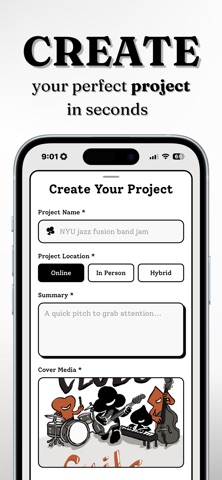
- Create and publish your own project with photos, videos, and custom application questions
- Manage your team – review applicants, accept members, create group channels
- Message your team directly in the app
- Share your project with a link anyone can open
Clubs was built for the people who have ideas but need the right people to make them happen. No algorithms trying to sell you something. No ads. Just people connecting over what they love.
Your next project is one swipe away!
What's new (v1.3)
Channels. Add what your club needs: tasks, files, forms, event tickets with a QR scanner at the door, shared costs, sheet music, card games, workouts. Set ranks and choose who can see what.
Organizations. An account your committee shares without sharing a password. Switch into it to post as the club, and give it a feed only your members can see.
Calls. Ring people in your club. It rings their phone from the lock screen.
Also new
• Pin, mark unread and delete, in chats and projects
• Comment on a PDF
• The map opens where you are — tap a cluster for the projects there
• Reshuffle the deck with one swipe
• Sign up with any email address
Fixed
• Notifications now reach everyone, not just project owners
• Unread counts and badges stay accurate
• Chats open on the conversation instead of loading into it
• The deck keeps finding projects instead of running dry
• Invite-only projects no longer show up on the web
• Signing out on one device no longer signs you out everywhere