Description
Struggling with pronunciation while reading English PDFs or articles? Looking up words breaks your reading flow?
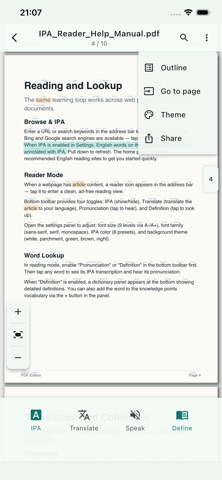
IPA Reader lets you open any PDF file or web page with automatic IPA phonetic annotations. Tap any word to hear pronunciation and see definitions instantly — no interruption to your reading.
KEY FEATURES:
READ — Browser + PDF + Reader Mode
- Built-in browser (Bing/Google search) and PDF reader with automatic IPA annotations
- Open PDFs from Files, Mail, or any app via "Open in" / Share
- Immersive reader mode: ad-free, adjustable fonts and themes
- American & British IPA modes, one-tap toggle
UNDERSTAND — Definitions + Translation
- Tap any word for definitions and pronunciation
- Native language definitions: Chinese, Japanese, Korean, Vietnamese, English
- One-tap translation: full article (web) or current page (PDF) via Bing/Google
LISTEN — Text-to-Speech
- Sentence-by-sentence playback with current sentence highlighting
- Adjustable speed (0.4x to 2.0x) for all proficiency levels
VOICE CUSTOMIZATION
- Voices strictly filtered by your accent preference (American or British)
- "Auto" intelligently selects the highest quality voice on your device
- Preview and compare each voice before selecting
- Supports system voices and third-party TTS engines
PRACTICE — Shadowing + Flashcards
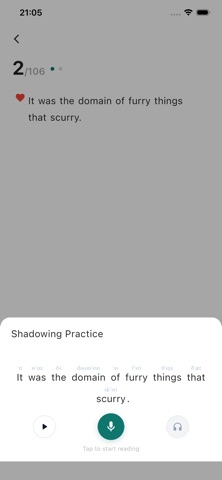
- Shadowing: record your reading, intelligent scoring for pronunciation assessment
- Flashcard review: separate modes for vocabulary and sentences
GROWTH — Learning Dashboard
- Set daily goals and build study streaks
- Visual progress insights and learning analytics
- Growth system available in 51 languages
ORGANIZE — Collection + Notes + Bookmarks
- Save words and sentences with color-coded personal notes
- Bookmarks, browsing history, and archive management by source
PRIVACY & MULTI-LANGUAGE
- All data stored locally — no registration, no data collection
- Interface available in 50+ languages
Whether you're preparing for TOEFL, IELTS, Cambridge, GRE, or reading academic papers, textbooks, novels, or news articles, IPA Reader is your perfect companion for mastering English. Download now!
Terms of Use (EULA):
https://www.apple.com/legal/internet-services/itunes/dev/stdeula/
What's new (v1.0.10)
- New learning growth dashboard with goals, streaks, and progress insights
- Improved practice experience
- Growth features localized across all 51 supported languages
- Word lookup now works inside links; sharing is more reliable