Description
Your wallet is full of plastic you never carry. Img2Wallet fixes that.
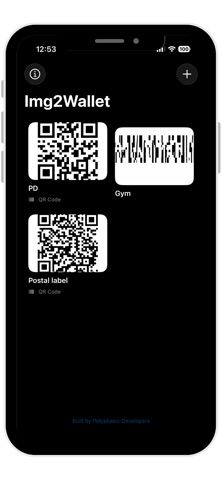
Take a screenshot of any loyalty card, gym membership, library card, or store card — Img2Wallet automatically detects the barcode, signs it as a native Apple Wallet pass, and adds it right to your iPhone. Show it at the till, let them scan it, done.
How it works
Snap a photo or screenshot of your card. Img2Wallet reads the barcode automatically. Tap "Add to Wallet" and within seconds it's a proper, scannable pass sitting alongside your boarding passes and payment cards.
Features
• Automatic barcode detection — QR, PDF417, Aztec, Code 128, EAN, and more
• Native Wallet passes — full-size, scan-ready, not just an image
• Max Brightness mode — boosts your screen automatically at checkout
• Rename and organise your cards any time
• Remove cards from Wallet if you cancel a membership
Perfect for:
Gym memberships · Coffee shop loyalty cards · Library cards · Supermarket reward cards · Cinema points cards · Any card with a barcode you keep forgetting to bring
Built by Polyphasic Developers.
What's new (v1.3)
• Fixed QR codes appearing cut off and failing to scan after adding a card to Apple Wallet
• Passes with a detected barcode now use Wallet's native barcode display, so QR, PDF417, Aztec and Code 128 codes stay sharp and scannable
• Improved barcode cropping, and corrected the barcode type shown on card tiles