Description
RemoteLight is a third-party remote play app for iPhone, iPad, and Apple silicon Mac, designed to help you connect to PS5 and PS4 with more flexibility and continue your games at home or away from your console.
Whether you are in the living room, in bed, or on the go, RemoteLight gives you more control over streaming quality, input methods, and runtime tools, so your console experience can move with you.
Features
Local and Remote Play
Connect to your console on the local network, or use remote connection options for supported setups so you can keep playing in more places.
Flexible Streaming Settings
Choose resolution, frame rate, bitrate, codec, and rendering method to better match your network conditions and device performance.
H.264, H.265, and H.265 HDR
Supports multiple codec options, including HDR streaming on compatible devices for richer highlights and color detail.
Metal Rendering and MetalFX Upscaling
Offers both system rendering and Metal rendering. On supported devices, MetalFX upscaling and sharpness options can further improve image detail.
Controller and Virtual Controls
Works with DualSense, DualShock 4, and compatible controllers. Virtual controller and virtual touchpad support are also available for more flexible play styles.
Haptics and Adaptive Triggers
On supported controllers, the app supports vibration, haptic feedback, and adaptive trigger features for a more complete gameplay experience.
Motion, Touchpad, and Microphone
Supports device motion input, controller motion input, touchpad actions, and in-stream microphone features where available.
In-Game Menu and Performance Overlay
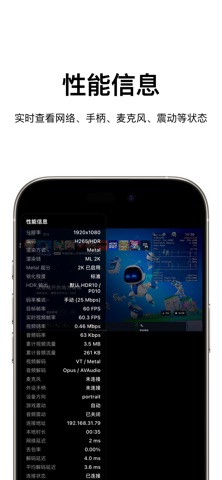
Open the in-game menu at any time to adjust virtual controls, touchpad, performance overlays, display position, and other stream options. You can also monitor latency, bitrate, frame rate, and more.
Host and Account Management
Manage hosts, local accounts, PSN-related configuration, and backup import/export for easier migration across devices.
Before You Start
1. Enable Remote Play on your PS5 or PS4
2. Make sure your console and device are on a working network
3. Add your console and complete pairing in the app
4. For remote connection, complete the required account and connection setup first
Recommended Environment
- Stable 5GHz Wi-Fi or better
- Wired connection for the console when possible
- A compatible external controller for the best gameplay experience
- HDR, Metal rendering, and upscaling availability may vary by device capability
Supported Platforms
- iPhone
- iPad
- Apple silicon Mac
Disclaimer
This is a third-party remote play app.
“PlayStation”, “PS5”, “PS4”, “DualSense”, “DualShock”, and related names and marks are trademarks of Sony Interactive Entertainment Inc. or its affiliates.
RemoteLight is not affiliated with, endorsed by, or officially associated with Sony Interactive Entertainment Inc.
What's new (v1.2.3)
What’s New:
- The app is now officially named “RemoteLight,” or “遥光” in Chinese.
- Refined the home screen title and subtitle appearance on iOS 26.
- Updated the guide link on the Add Host screen.
- Improved UI details and system compatibility.