Description
FlockTrax-MOBILE is the mobile field-collection app for the FlockTrax platform.
Designed to work alongside the FlockTrax-ADMIN web console, the mobile app helps farm and operations teams capture data in the field, keep records current, and support faster, more accurate reporting across the complex.
Use FlockTrax-MOBILE to:
• collect flock and operational data while working on-site
• enter updates in real time from the field
• support accurate recordkeeping across teams
• sync information used by the FlockTrax-ADMIN web console
• reduce delays, missed notes, and manual re-entry
FlockTrax-MOBILE is built for practical day-to-day use in working environments where speed, clarity, and dependable data capture matter.
The web console provides broader management and administrative capabilities, while FlockTrax-MOBILE focuses on efficient mobile data collection and operational support.
What's new (v1.0.7)
FlockTrax Mobile 1.0.5 Release Changes
Date: 2026-07-13
Release Baseline
This list describes the user-facing mobile changes accumulated since the last confirmed public iOS release, 1.0.1
(10), which went live on 2026-05-06.
Work Orders And Action Items
• Added a dedicated Work Orders workspace without cluttering the daily flock-care dashboard.
• Lists open Action Items across the farms and barns available to the signed-in worker.
• Supports By Barn and All Barns views, search, classification, ownership, status, and sort filters.
• Added an optional Include Resolved view with green resolved-item edge markers.
• Added complete dated memo/update history to each ticket.
• Workers can post progress, parts-ordered, ordinary memo, and resolution entries.
• Saving a memo keeps the worker on the same ticket and immediately refreshes its history.
• Ticket modals now move above the mobile keyboard so entered text remains visible.
• Added a placement-level Action Items tab and a Barn Repairs shortcut from flock cards.
• Preserved the Action Item audit trail by adding new dated entries rather than editing saved memos.
Read-Only Operations Calendar
• Added a third dashboard workspace for upcoming Placements and Livehaul schedules.
• Added month navigation and separate placement/livehaul filtering.
• Placement badges show the scheduled chick count and support separate male/female arrival dates.
• Livehaul badges show the scheduled bird count to be taken.
• Tapping a badge opens limited operational detail only.
• The calendar contains no create, edit, delete, reschedule, or administrative controls.
• Upcoming placements in both scheduled and awaiting_arrival lifecycle states are included.
Weather And Daily Conditions
• Added farm selection to the dashboard weather popup using farms visible to the worker.
• Expanded weather into compact Now, Forecast, and Farm Details views.
•Added feels-like temperature, relative humidity, wind, gusts, precipitation, cloud cover, pressure, visibility,
dew point, sunrise/sunset, and UV information where available.
• Added a seven-day forecast while keeping the immediate conditions display compact.
• Added current relative humidity to daily-log weather collection and persistence.
• Existing historical weather values are preserved rather than overwritten with current conditions.
Daily Flock Work
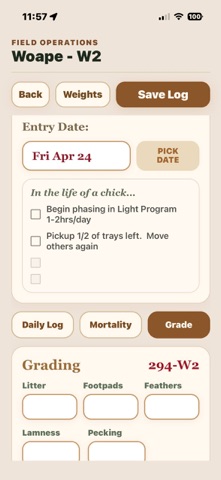
• Improved historical daily-log date navigation and date-picker behavior.
• Corrected historical entry handling so work can be recorded against the intended log date.
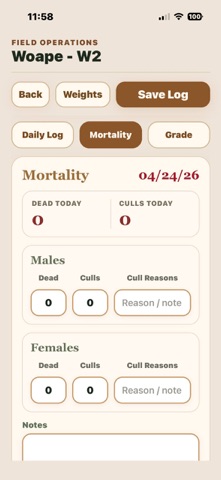
• Improved mortality, grading, and permission handling so unrelated null grading values do not block an
authorized mortality save or incorrectly appear as an expired session.
• Added clearer first-seven-day mortality summaries and recent-mortality access.
• Improved feed-drop controls and recovery behavior, including off-farm redirected drops.
• Corrected dashboard lifecycle selection so the true current or awaiting-arrival flock is shown.
Account And Release Reliability
• Retained the in-app account deletion flow required by Apple.
• Improved session persistence, authentication recovery, and user-facing authorization errors.
• Added published mobile version/build/date display from hosted release control metadata.
• Updated the Expo/React Native release baseline and production bundle configuration.
Release Identifiers
• Marketing version: 1.0.5
• iOS build: 17