Description
Fun Keyboard is a custom iOS keyboard with built-in mini-games. Tap the bird key from any text field to open a game without leaving your conversation. Tap ABC to jump back to typing.
EIGHT GAMES, ALL INSIDE THE KEYBOARD
• Echo — replay the growing color-and-sound sequence. One pad longer every round.
• Tic Tac Toe — three-in-a-row against the keyboard. Pick a difficulty, chase a streak.
• Peg Drop — release fifteen balls and watch them bounce into scoring slots. Stack drops, climb the total.
• Pipe Hopper (Pro) — tap to flap, weave through the gaps. One mistake and it's over.
• Block Breaker (Pro) — slide the paddle, shatter every brick. Power-ups for wide paddle, fire ball, multi-ball, and shield.
• Pixel Run (Pro) — endless runner that keeps scrolling until you misjudge a jump.
• TypeBolt (Pro) — typing-speed sprint. Correct letters fill in white, mistakes glow red but the run keeps going.
• Glow Coil (Pro) — neon snake on a wrap-around grid. Eat apples to grow, just don't cross yourself.
A FULL KEYBOARD FIRST
Fun Keyboard is a real, full-featured keyboard — the games are a bonus. Hold a letter for accent variants. Press and hold space to drag the cursor. Double-tap shift for caps lock. Full emoji picker with search, recents, and skin-tone variants. Type comfortably in English, Arabic, French, or Russian, and switch languages with a long-press on the globe.
MAKE IT YOURS
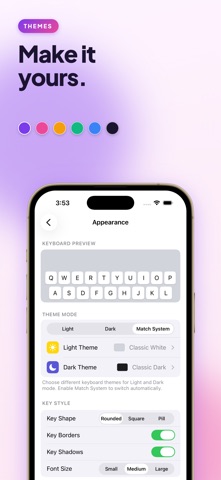
• Light and dark themes with auto-switch to match system mode
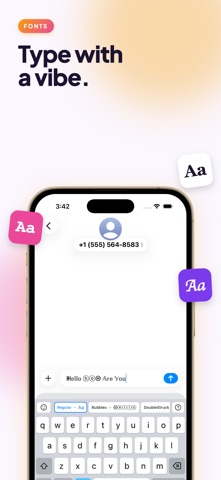
• Customizable fonts for all supported languages
• Built-in palettes (Classic White, Soft Cream, Mint Frost, OLED Black, Midnight Blue, and more)
• Custom themes — pick every color: background, keys, key text, special keys, accent
• Drop in a photo as your keyboard background (Pro)
• Three key shapes (rounded, square, pill), three font sizes, optional borders and shadows
• Per-key sound and haptic feedback toggles
PRIVATE BY DEFAULT
Fun Keyboard does not collect or transmit anything you type. The keyboard does not request Open Access — no network permission, no clipboard access — so what you type stays on your device. There are no ads. The companion app uses TikTok and Meta SDKs only to attribute the marketing campaigns we run on those platforms; you can opt out at any time through iOS App Tracking Transparency.
FUN KEYBOARD PRO
Pro unlocks the five premium games, unlimited custom themes, and custom background images. Available as:
• Weekly subscription
• Monthly subscription
• Yearly subscription (best value)
• One-time Lifetime purchase
The free tier includes Echo, Tic Tac Toe, and Peg Drop, plus one custom theme — so you can try the keyboard before deciding.
GETTING STARTED
After installing, go to Settings → General → Keyboard → Keyboards → Add New Keyboard → Fun Keyboard. Tap the globe key in any app to switch to it. Long-press the globe to choose between Fun Keyboard's languages.
Subscriptions auto-renew unless cancelled at least 24 hours before the period ends. Manage or cancel any time from Settings → [Your Name] → Subscriptions, or at apps.apple.com/account/subscriptions.
Terms of Service: https://majds.dev/funkeyboard/terms.html
Privacy Policy: https://majds.dev/funkeyboard/privacy.html
What's new (v1.4)
Five new games and a full emoji picker — Fun Keyboard now has eight mini-games inside the keyboard.
• Echo — Simon-says color and sound memory (free)
• Tic Tac Toe — three-in-a-row against the keyboard (free)
• Pixel Run — endless runner (Pro)
• TypeBolt — typing-speed sprint (Pro)
• Glow Coil — neon snake on a wrap-around grid (Pro)
• Full emoji picker with search, recents, and skin-tone variants
• Polish across the game picker and plan-comparison screens