Description
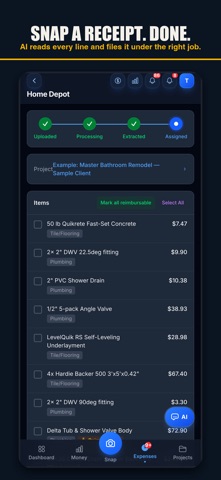
Job Cost Pro is the AI cost tracker built for remodelers,
contractors, and trade pros. Snap a receipt at the supply yard — AI
reads every line item, sorts it into 13 construction categories,
matches it to the right job, and updates your profit margin in
seconds. No spreadsheets. No bookkeeper.
Built by a Fort Worth remodeling contractor for the way the trade
actually works.
WHAT THE AI DOES (it does a lot)
• Reads any receipt — Home Depot, Lowe's, Ferguson, Ace, lumberyards,
thermal slips. Multi-page receipts auto-merge.
• Sorts every line item into the right construction category
(lumber, plumbing, electrical, paint, drywall, fixtures, hardware,
insulation, roofing, appliances, concrete, tile, misc).
• Matches receipts to projects by PO/Job name — even when the cashier
misspells it. "jonson kitch" matches "Johnson Kitchen".
• Catches duplicate receipts AND duplicate labor payments before they
inflate your costs.
• Reads return receipts and subtracts them from the right project
automatically.
• Detects Zelle, Venmo, CashApp, and check photos as labor payments
with worker name, amount, and method.
• Voice-to-expense — speak naturally and AI parses amount, vendor,
project, and category.
• Reads bid PDFs you upload — extracts scope, totals, and line items
in seconds.
• Reads contract PDFs you upload — extracts client name, project
scope, and contract amount.
• Writes a year-end tax narrative for your accountant inside your
one-click tax package export.
• Chat with your data — ask "what's my margin on the Smith kitchen?"
and the AI answers using your live project numbers.
• Remembers your pricing rules, markup rates, and vendor preferences
across every chat — server-side, encrypted, RLS-locked.
THE WHOLE WORKFLOW
• Real-time profit margin — set a contract amount + change orders,
see live profit-per-day as receipts and labor land
• Project Health 0-100 score — budget, pace, receipt coverage, and
category mix in one number
• Spend-pace progress bars vs. project end dates
• Budget alerts when a project crosses thresholds
• Change order tracking with auto-roll-up into profit math
• Photo gallery per project — for clients, disputes, and your records
• Client portal — share a live cost link that builds trust and
justifies your invoices
• White-label invoices and reports with your logo and brand colors
• Universal search across every receipt, item, and vendor
• Archive system with soft-delete + restore (clean up without fear)
CREW MANAGEMENT (GPS + payroll: Contractor+)
• Add team members with pay rates and roles
• GPS clock-in/out with geofence verification at jobsites
• Mileage tracking at the IRS standard rate ($0.70/mi)
• Subcontractor submission portal — subs scan their own receipts
from a shared link, you see them all in your dashboard
• Payroll exports for your accountant or bookkeeper
TAX TIME IN ONE TAP
One ZIP download containing your year-end P&L, 1099 summary, expense
categories, all receipts, all expenses, all payments, mileage log,
and an AI-written year-end narrative. Hand it to your CPA and walk
away.
PRICING
• Free — 3 projects, 50 receipts/month, AI scanning, voice capture,
3 crew seats
• Pro — $29.99/mo or $299.99/yr — unlimited projects & receipts, 10 crew
seats, AI chat, budget alerts, client portal, invoice sending, all
exports
• Contractor — $49.99/mo or $499.99/yr — Pro + unlimited crew, GPS, auto
clock-in/out, mileage, payroll exports, white-label branding
• Business — $149.99/mo or $999.99/yr — Contractor + 1099 automation,
API access, dedicated support
Cancel anytime in iOS Settings → Subscriptions, or at jobcostpro.online.
BILINGUAL
Switch English/Spanish with one tap — every screen, every AI response.
PRIVACY & TERMS
Encrypted in transit and at rest. We never sell data or run ads. Export
everything as JSON + ZIP.
Privacy Policy: https://jobcostpro.online/privacy
Terms of Use (EULA): https://jobcostpro.online/terms
Support: support@jobcostpro.online
What's new (v1.0.7)
What's new
• Crews — group your team into crews with a lead. Assign a whole crew to a project in one move. The lead sees who's clocked in and their hours for the day — never anyone's pay.
• Lunch, handled honestly — nothing is deducted by default. Declare the crew's lunch each day (30, 45, or 60 minutes, or none) right from the clock screen, and payroll subtracts it from hours before overtime. Running payroll flags any crew day with no declaration.
• Day-rate pay — pay a team member a flat amount per worked day instead of hourly. Days queue for your approval, and a paid day is locked so it can never pay out twice.
• Overtime, your call — flat pay stays the default. Turn on weekly overtime in payroll settings and set your own hours threshold.
• Each worker, their language — every team member's screens and notifications in English or Spanish, set per person.
• Worker invite links now arrive working for brand-new hires, unopened links expire after 30 days for safety, and you're told if an invite email doesn't go out.
• Evening digest — one push at 8 each night: hours with lunch deducted, who's still clocked in, lunch declarations, and day-rate days pending your approval. Off switch on the Team page.
• Optional auto clock-in — consent-gated: the company can enable it, but it arms only after the worker agrees to a location disclosure.
• Owner-operators can pick, clock into, and see hours on another contractor's job.
• New alerts: an overtime threshold crossed, a project nearing its budget, and when a client views an invoice.
• A receipt's line items get checked against its total, with a flag if they don't add up.
• Duplicate-receipt detection now re-checks after you edit, rescan, or a crew member scans.
• Client statement PDFs open reliably on iPhone.
Thanks for using Job Cost Pro.