Description
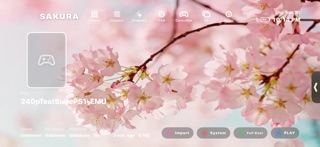
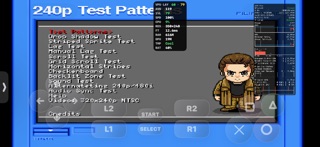
Sakura is a PlayStation One & PSP emulator frontend built on top of the Beetle PSX and PPSSPP cores for iPhone and iPad. Add your own system BIOS and disc backups & customize your library then play with on-screen controls or a physical gamepad/controller for a console-like experience!
• Add your own PS1 BIOS (.bin) file(s) and choose a default in Settings; PSP games boot without one.
• Add games under the app’s Documents folder in Files, or use in-app import. Sakura scans folders recursively, including multi-disc setups and M3U playlists.
• Supported formats CUE/BIN, CHD, PBP, M3U, ISO/IMG, MDS/MDF, NRG, CDI, ECM, CSO/ZSO
• One library for both systems, with a system switch in the library bar that picks which settings you get and which system Boot System starts.
CONTROLS
• Full touch overlay with layout editor: move, scale, and theme controls to fit your hands.
• Digital and DualShock-style modes, with optional per-game auto-switching.
• MFi and Bluetooth gamepads with remappable buttons; haptics and rumble where supported.
• Analog deadzone, axis scale, and gate compensation on both systems.
GRAPHICS & PERFORMANCE
• Internal resolution scaling, fit vs fill framing, and multiple texture filtering paths from crisp pixel modes through sharpened upscalers.
• FXAA, CAS, optional PGXP-style geometry options, widescreen-related tweaks, color and dither controls, and frame blending where you want a softer or more authentic look.
• Libretro Shaders: load your own slang presets, pick a built-in CRT or TV preset, or pull the shared pack from inside the app.
• Fast Boot and host-side run speed for slow-mo or fast-forward-style pacing alongside core tuning for CPU, GPU, and disc access.
QUALITY OF LIFE
• In-game menu for graphics, performance HUD, save slots (when enabled in Settings), controller remapping, and stopping a session.
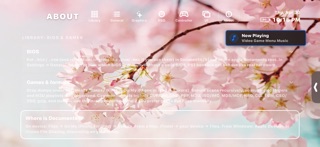
• Optional performance overlay, notification cards, and extensive UI customization: accents, backgrounds, typography, accessibility options, and optional background music including your own tracks.
LEGAL
Sakura does not include games, a PlayStation or PSP BIOS, firmware, or other copyrighted material you don’t have rights to use. You are responsible for complying with the laws that apply to you. “PlayStation”, “PSP” and related names are trademarks of Sony; this app is not affiliated with or endorsed by Sony Interactive Entertainment.
What's new (v0.0.3)
One library for two systems!
Library
• PSP games game now be played in sakura
• The system switch in the library bar picks the settings and what Boot starts.
PICTURE & accuracy improvements
• Libretro Shaders.
• PlayStation is Metal only now. The software renderer is gone.
• Flat and raw-texture polygons no longer dither. Big flat surfaces stop speckling.
• Graphics failures get reported instead of vanishing.
IN GAME
• Remap moved into Quick Actions. The game stays paused while you do it.
• Tap-to-close hints and controller prompts on every panel.
• The volume HUD stopped stealing the audio session mid-game.
• Controller focus scrolls instead of running off the panel.
LIBRARY
• Covers and media thumbnails are cached. The second launch is quick.
• Achievements bar, with friends and per-game progress.
• Per-game folders key on the game ID, so nothing lands under the wrong game.
• New guided tour.
SOUND
• Twelve-band EQ for app and menu music. The game equalizer is still its own.
FIXES
• Save and Load were mistranslated in about twenty languages.
• Three labels showed a raw key name instead of words.
• Portrait popups sit on the right floor.
• Filter chains survive an update.
• Announcements stopped retrying a dead feed.
• Four volume bar styles that were missing from Themes.