Description
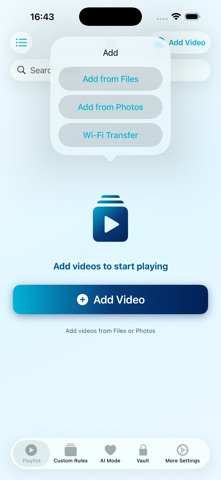
Easyfreedom – Play Your Way!
This is a powerful and unique video player designed for iOS users. In addition to playing common video formats like MKV, AVI, MP4, MOV, WMV, RMVB, FLV, TS, MTS, ASF, DivX, OGG, and many others, we’ve pioneered a brand new mode: random clip playback!
Once enabled, videos no longer have to be played from start to finish. Instead, based on the number of clips and duration per clip you set in Custom Rules, the player randomly selects clips from the entire video and plays them in order (or shuffled). It’s like browsing short videos while revisiting a long movie – old videos feel new every time.
You can choose between two rhythms:
Play clips in the current video first (with options to loop clips, select order, or shuffle), then move to the next video in your list.
Or enable full-list shuffle, which randomly mixes clips from multiple videos in your list and plays them continuously in random order – perfect for casual viewing with pleasant surprises.
You can also adjust whether to allow clip overlap and how often the random parameters refresh.
Other Features:
Custom Rules – Play Your Way
Create multiple playback rules and combine them into dozens of playback modes.
Random Video Clip Playback
Shuffle and recombine clips to rediscover old videos in new ways.
Wide Format Compatibility & Efficient Playback
Supports MKV, AVI, MP4, MOV, WMV, RMVB, FLV, TS, MTS, ASF, DivX, OGG, and many more.
Encrypted Space – Privacy Protection
Supports space encryption and a special self-destruct password.
Clean Experience
We promise that during the validity period of your VIP membership, we will not display any advertisements to you.
The App includes VIP services:
Weekly $0.99, Monthly $2.99, Yearly $9.99, Lifetime $19.99.The above prices are subject to change based on promotional activities and exchange rates in different countries or regions. Please refer to the actual price displayed before payment. Purchasing any of the above memberships will unlock all paid features.
Terms of Use: https://docs.qq.com/doc/DUVJZY3J1VFFWZGNt
Privacy Policy: https://docs.qq.com/doc/DUURiU2J1QmxXb2hq
What's new (v1.9)
Fixed known bugs