Description
Lamby Talker: Simple AAC Communication
Simple AAC communication without complicated setup.
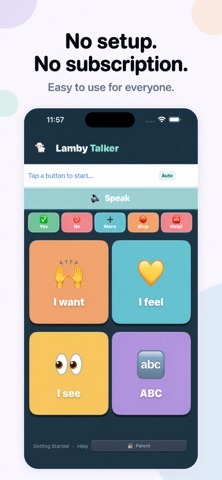
Lamby Talker helps children and adults express wants, feelings, needs, and ideas using large visual buttons and complete spoken phrases. Open the app, tap a button, and communicate.
No internet is required, making Lamby Talker perfect for home, school, therapy, appointments, travel, and communication on the go.
Built by a mom after 10 years of helping her child communicate, Lamby Talker was created for families who found traditional AAC apps and speech devices too complicated, overwhelming, or expensive.
COMMUNICATE WITH ONE TAP
Each button uses a complete phrase such as “I want to eat,” “I feel happy,” or “I need help.” There is no pressure to construct sentences one word at a time.
A quick menu keeps essential words within reach, including Yes, No, More, Stop, and Help.
CHOOSE HOW SPEECH WORKS
Speech is completely optional. Buttons can speak automatically when pressed, or users can select a phrase first and press Speak when they are ready.
This gives sound sensitive users more control. The screen can also be shown silently when visual communication feels more comfortable.
BOLD OR CALM COLORS
Choose vivid colors for a bright, high contrast experience or pastel colors for a softer and calmer appearance.
SPELLING WHEN NEEDED
Use the ABC keyboard for letters in alphabetical order or choose the familiar QWERTY layout. The keyboard can also be hidden to simplify the experience and reduce distractions.
ENGLISH AND SPANISH
Lamby Talker includes menus, categories, buttons, and phrases in English and Spanish. Spanish voice recommendations help families choose voices with clear, natural accents.
MAKE IT PERSONAL
The Full Version lets families create communication tools around the user’s real life.
• Create custom categories
• Add, edit, and remove buttons
• Write personalized phrases
• Use photos as button images
• Choose and preview voices
• Select vivid or pastel colors
• Choose an ABC or QWERTY keyboard
SUPPORT FOR DIFFERENT COMMUNICATION NEEDS
Lamby Talker is designed for autistic people, people with apraxia, gestalt language learners, and people who do not speak or speak very little.
Its large buttons, simple layouts, visual choices, and optional speech may also be helpful for people with hearing differences, dyslexia, vision differences, Alzheimer’s, developmental differences, cognitive difficulties, or other conditions that affect communication.
PRIVATE AND READY ANYWHERE
• Works completely offline
• No ads
• No subscriptions
• No accounts
• No data collection
• Information stays on the device
Start free with essential AAC communication tools. Unlock the Full Version with one affordable purchase for the price of a coffee.
Lamby Talker can be a first communication tool, a long term AAC solution, or a simpler companion to a more complex speech device.
Every person deserves a way to be heard.
What's new (v1.2)
Welcome to Lamby Talker 1.2!
• Full English and Spanish support across menus, categories, and communication buttons
• Recommended voices for clearer, more natural pronunciation in each language
• Choose vivid colors for bold contrast or pastel colors for a calmer experience
• A new setup screen makes choosing your language, voice, and colors simple
• Choose whether speech plays automatically or only after pressing Speak
• Switch between ABC and QWERTY keyboard layouts
• Hide the keyboard to reduce distractions
• Create and edit custom buttons and categories with the Full Version
• Add your own phrases, emojis, and photos
• Quick access to Yes, No, More, Stop, and Help
• General design, accessibility, and performance improvements
Communication is now more personal, flexible, and accessible. Thank you for supporting Lamby Talker!