Description
Voice to Text Offline turns everything you say into clean, structured notes, without ever sending a byte to the cloud.
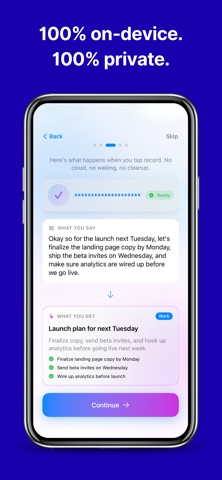
Tap record, speak your mind, and get back a titled, summarized, fully searchable note in seconds. All transcription happens on your device using Apple's on-device speech engine, so it works on airplane mode, on the subway, in meetings, or anywhere else Wi-Fi doesn't.
WHY IT'S DIFFERENT FROM VOICE MEMOS
Voice Memos records sound. Voice to Text Offline records meaning. Every note you create comes with:
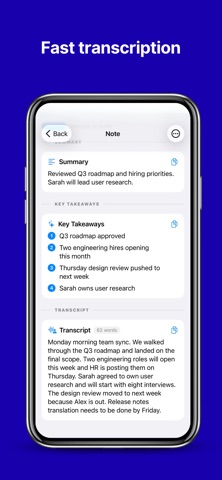
• An auto-generated title
• A clean summary of what you said
• Extracted key points as a bullet list
• A smart category like Work, Ideas, To-Do, or Journal
• A fully editable transcript you can refine later
100% OFFLINE, 100% PRIVATE
• Transcription runs entirely on your iPhone or iPad
• No audio is ever uploaded
• No account, no tracking, no analytics on your voice
• Works on airplane mode, with Wi-Fi off, anywhere in the world
BUILT FOR REAL LIFE
• Keeps recording in the background while you use other apps
• Pause, resume, or cancel mid-recording
• Import existing audio files (m4a, mp3, wav, aac, and more) and transcribe them on device
• Quick Capture widgets and Control Center controls to start recording without opening the app
• Live Activities on the Lock Screen and Dynamic Island so you always know it's listening
• Write text-only notes too, for when typing is faster than talking
ORGANIZED THE WAY YOU THINK
• Notes are automatically grouped by category
• Filter by category with one tap
• Rich detail view with summary, key points, full transcript, and original audio
• Edit titles, summaries, key points, and transcripts any time
• Play back the original recording alongside the text
GREAT FOR
• Students capturing lectures
• Journalists running interviews
• Creators dictating ideas on the go
• Professionals logging meetings without uploading to a cloud service
• Anyone who thinks faster than they type
Developed by Fastemy - Fast and Fun Education
Terms of Use: https://www.apple.com/legal/internet-services/itunes/dev/stdeula/
What's new (v1.0.7)
Bug fixes and performance improvements