Description
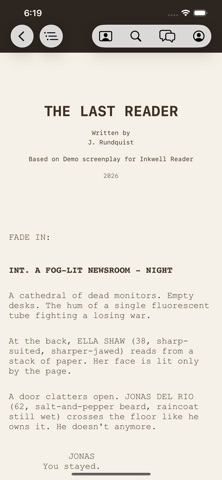
Inkwell Reader is a clean, fast script reader for iPhone and iPad — built for writers, actors, directors, and crew who'd rather read their script on the device in their hand than print 120 pages.
Open .ink projects from Inkwell, plus Fountain and PDF scripts from anywhere. Pages are laid out the way screenplays are meant to be read: correct margins, dual-dialogue side-by-side, scene numbers in the
margin, properly placed (MORE) and (CONT'D) markers. Pinch to size, scroll smoothly, scrub through scenes with the outline drawer.
KEY FEATURES
· A real script reader, not a PDF viewer. Industry-standard layout for Fountain and .ink documents. PDFs open in a fast, tappable PDFKit viewer.
· Scene outline drawer with one-tap jump to any heading.
· Full-text search across the entire screenplay.
· Files.app integration — open documents in place, no copy required.
· Themes: paper, sepia, focus, midnight. Adjustable type size.
· Works fully offline. Scripts live on your device. Nothing is uploaded unless you sign in to chat with Quill.
QUILL (OPTIONAL)
Sign in to your Inkwell account and Quill — the Inkwell screenplay assistant — rides along. Discuss characters, structure, themes, and pacing right next to the script you're reading. Read-only on iOS: Quill
won't edit your script. The full agentic editor lives on macOS at inkwell.app/download.
Sign in with Apple, Google, or a one-tap email link. No password to remember.
REQUIREMENTS
Free to download and read. Quill chat requires an Inkwell account, free to create at inkwell.app.
PRIVACY
Inkwell Reader does not track you across other companies' apps and sites. Anonymous product analytics are opt-in. Quill conversations are sent only to Inkwell's backend so the model can reply. Full details:
https://inkwell.app/privacy
What's new (v1.2.1)
Your scripts now travel with you.
Turn on sync in the Inkwell editor on your Mac, and your screenplays are waiting for you here — on your iPhone and iPad. They travel end-to-end encrypted: each script is encrypted on your Mac before it's uploaded, and the key that opens it stays on your own devices. Sync is optional and off by default.
• Your synced library appears automatically when you sign in, each script marked with a cloud icon.
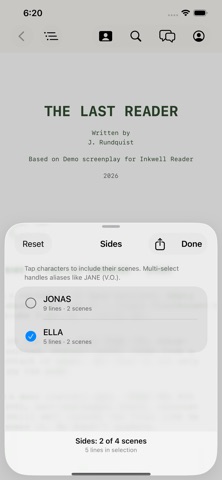
• Scripts download on tap, then read fully offline — with Sides highlighting, search, and reading themes.
• New device? Unlock your encrypted library with your recovery code.
• Plus PDF importing, and reliability fixes throughout.
The full writing experience lives in the Inkwell editor for Mac at inkwell.app.