Description
PhoneDeck needs two free apps to work : this iPhone app + the Mac companion app at phonedeck.io .
Both are 100% free, forever. No account needed.
Stuck or something not working? DM me directly on Instagram @PhoneDeckApp - I reply personally, usually within a few hours.
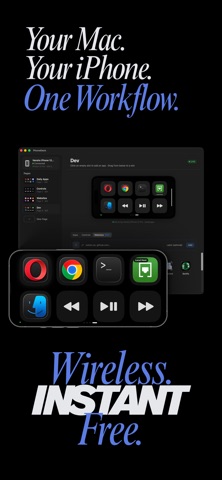
Turn your iPhone into a wireless Mac controller. Launch any Mac app, trigger system controls, open any website all with one tap.
Think Stream Deck, but you already own the hardware.
--------------------------
HOW IT WORKS
--------------------------
• Install this app on your iPhone
• Download the Mac app from phonedeck.io (free DMG)
• Open both apps on the same WiFi - they pair automatically
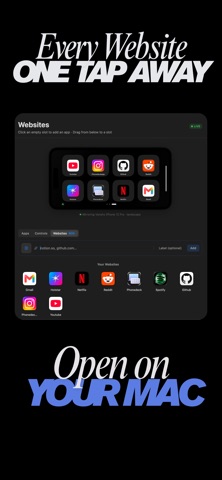
• Drag any Mac app, control, or website onto a tile
• Tap your iPhone to launch
No account. No cloud. No subscription. No data leaves your devices.
--------------------------
WHAT YOU CAN DO
--------------------------
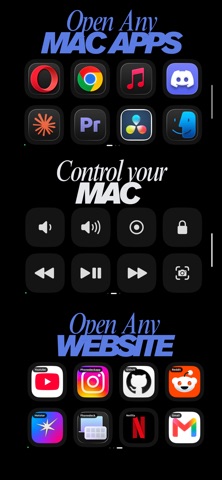
APPS : Launch any Mac app with one tap. VS Code, Figma, Cursor, Premiere, Photoshop, Slack — anything installed on your Mac.
CONTROLS : 16 built-in Mac controls: volume, brightness, keyboard backlight, media play/pause/next/previous, screenshot, screen recording, dictation, lock screen, show desktop, mission control, empty trash.
WEBSITES : Drag any URL onto a tile. YouTube, ChatGPT, Linear, Figma files, your dashboards — one tap and it opens on your Mac.
PAGES : Organize tiles into pages. One for Design, one for Dev, one for Music. Swipe between them on your iPhone.
--------------------------
WHY IT'S DIFFERENT
--------------------------
• Free forever. No subscription, no Pro tier, no ads, no tracking.
• Works over local WiFi. No account, no cloud, no data collection.
• Auto-updates on Mac : bug fixes ship the same day.
• Built by one indie developer. Every feature is something a user asked for.
--------------------------
WHAT YOU NEED
--------------------------
• An iPhone running iOS 17 or later
• A Mac running macOS 14+ or later
• Both devices on the same WiFi network
• The PhoneDeck Mac app from phonedeck.io (free download)
--------------------------
Made by one developer in Mumbai. Constantly updated. Feature requests welcome at phonedeck.io/request-feature or DM @PhoneDeckApp on Instagram.
What's new (vv1.4)
• Keyboard shortcuts, in beta.
• Put a key combination on a tile and fire it from your phone ⇧⌘4 to snip a screenshot, ⌃→ to switch desktops, ⌘⇧T to reopen the tab you just closed.
• Record any shortcut by pressing the keys you want. PhoneDeck captures them exactly, even the combinations your Mac normally swallows, like ⌘Q and ⌘Space.
• Or pick from 28 ready-made shortcuts, grouped by what they do windows and desktops, screenshots, tabs, view, editing. Name them whatever you like.
• Anything you record is saved, so it outlives the tile you made it for.
• It's beta for a reason: a shortcut goes to whichever app is in front, so whether it lands is that app's decision. There's a report link built in for the ones that miss.
• Your menu-bar apps are back. Tailscale, Docker, Stream Deck and others were being hidden from your app list — they're all there now.
• A Refresh button for the app list, so newly installed apps show up without restarting PhoneDeck.
• Keyboard tiles no longer blink when your phone connects.
• Your saved websites and shortcuts can no longer be wiped by a single unreadable entry.
• The Controls tab now tells you when a macOS permission is stopping a control from working, and which one.