Description
Everything you need to present — right in your hand.
No more clicker.
Time management, timers, slide control, pointer, mouse, keyboard and recording: the whole presenter's toolkit, on your iPhone and Apple Watch. You don't need to buy a separate clicker; your iPhone and Apple Watch are enough.
・The app is free. Time management, timers and slide control stay free, for good.
* A receiver app, PreGuru Receiver (Mac / Windows), is required on your computer (get it at https://preguru.app).
■ 1. ALL IN ONE: everything, in one place.
Time management, timers, slide control, pointer, mouse, keyboard and recording on iPhone and Apple Watch. Works with Keynote, PowerPoint and browser-based presentations. Wi-Fi, USB or Bluetooth.
■ 2. Main screen: time, timer, slides and recording.
• Time management: elapsed and remaining time in extra-large digits; switch between the two. The colour shifts as time runs low, and overtime flashes red.
• Timer: an independent countdown for exercises or breaks, separate from your talk time.
• Slide control: large back / next buttons.
• Recording [Full Version]: long-form recording on your iPhone, continuing in the background.
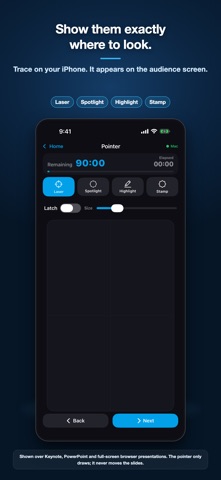
■ 3. Pointer [Full Version]: show them exactly where to look.
Trace on your iPhone and the pointer appears on the screen your audience sees.
• Laser
• Spotlight
• Highlight: latch to keep your lines, and erase with the eraser
• Stamp: three stamps included, plus your own PNG images
It appears over Keynote, PowerPoint and full-screen browser presentations. The pointer only draws; it never moves the computer's cursor or the slides.
■ 4. Mouse & keyboard [Full Version]: your iPhone becomes a mouse and keyboard.
Your iPhone becomes a trackpad: move, click (with a lock against accidental clicks), scroll and pinch-zoom. Type by keyboard or voice, so demos and Q&A don't send you back to the computer. Choose the cursor shape: arrow, hand or stamp.
■ 5. Apple Watch: time on your wrist, slides with a flick.
Check the time, run the timer and move slides from Apple Watch.
And Air Swipe [Full Version]: swing the wrist wearing your Apple Watch and the slide advances. Double Tap is supported too. No clicker in hand; your eyes stay on the room.
Apple Watch dims and sleeps when you are not looking, and swings then never arrive. PreGuru tells you by haptics: two rising taps mean you can send; one falling buzz means tap the face once; one light tap means it was sent.
On-device learning suppresses unintended triggers; nothing leaves the device.
■ iPhone alone works too.
Everything works with just your iPhone, Full Version features included; no Apple Watch required.
■ Start free. The Full Version is a one-time purchase.
[Free] Time management, timers, slide control, Apple Watch time / timer / back-next
[Full Version] Pointer, mouse & keyboard, Air Swipe, Double Tap, audience clock, recording
One in-app purchase unlocks it for good. No subscription. Earlier buyers of the paid version already have it. Restore Purchase is in Settings.
__________
Good to know
• Slide control, the pointer, the mouse and the keyboard require the free PreGuru Receiver (Mac / Windows). For the pointer and mouse, use the latest receiver (Mac 1.3.7 / Windows 1.3.7), available at https://preguru.app. "No more clicker" means you don't need to buy a separate clicker device.
• Mouse and keyboard input works only while "Allow remote input" is on in the receiver (off by default). On Mac, the receiver needs Accessibility permission.
• Connection: Wi-Fi, USB or Bluetooth (see the receiver's instructions).
• Google Slides, Canva, Prezi and other browser-based presentations work through arrow keys and the on-screen pointer; this is not an official integration or endorsement. All names are trademarks of their owners.
• Air Swipe is an Apple Watch feature and requires Apple Watch Series 9 or later, or Apple Watch Ultra 2 or later.
• Recorded audio stays on your device and is never sent to any server.
What's new (v1.4.0)
PreGuru is now free to start.
• Time management, timers and slide control (back / next) are free
• Pointer, mouse & keyboard, Air Swipe and Double Tap on Apple Watch, audience clock and recording are unlocked by the Full Version (one-time in-app purchase)
• If you bought the paid version before, you keep every feature, with nothing more to pay
• New "Full Version" row in Settings (purchase status and Restore Purchase)
• Improved Bluetooth stability (for example after the computer wakes from sleep)
• Please use the latest receiver (Mac 1.3.7 / Windows 1.3.7), available at preguru.app.