Description
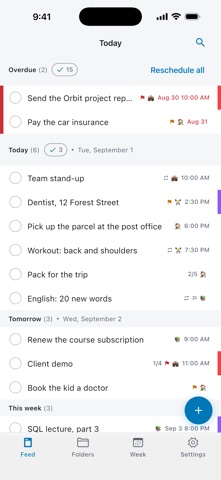
Just Plan does not show a list of tasks. It shows one flow of your day.
DAY FEED
Every task from every folder lands in a single feed: overdue, today, tomorrow, this week, later, no date. You no longer walk through five lists to find out what today looks like. The folder is just a coloured mark on the card. Swipe right to complete, swipe left to reschedule.
SMART REMINDERS
• Morning digest — one notification instead of ten: how many tasks today, how many overdue.
• Timed reminders only for tasks that actually have a time.
• Quiet hours: a notification that falls into the quiet interval is moved to an allowed time instead of being lost.
• Persistent reminder: for an important task, repeat the alert every N minutes until it is done.
• Snooze for 15 minutes straight from the notification, without opening the app.
WEEK
Seven days side by side: you can see that Tuesday is overloaded and Thursday is empty. Drag a task from one day to another.
ALSO INSIDE
• Repeating tasks: daily, weekdays, weekly, monthly, yearly or a custom interval.
• Subtasks with progress.
• Folders with their own colour and emoji.
• Four priority levels and labels.
• Search by title and note.
• Templates for tasks you create again and again.
• Completion statistics.
• Trash: deleted items are kept for 30 days.
• Export and import as a file — a backup and a way to move to a new phone.
• Light and dark theme, English and Russian.
NO NETWORK, NO DATA COLLECTION
The app makes no network requests at all. No account, no sign-up, no cloud, no sync. No analytics, no tracking, no ads. Tasks, notes and settings are stored on your device only. The backup is an ordinary file, and you decide where to keep it.
The only permission the app asks for is showing notifications. No camera, no location, no contacts, no microphone.
Free, with no in-app purchases, subscriptions or ads.
What's new (v1.1.0)
• Folder archive. A project you don't need right now can go to the archive with all its tasks. They leave the feed, the week, search, statistics and reminders, and wait until you bring the folder back. When you do, the app asks once what to do with overdue dates. The archive is in Settings, under Data.
• Protection from accidental taps. A task you tick off doesn't vanish at once: for five seconds it stays in place, crossed out and highlighted. Changed your mind? Tap the circle again.
• The completion circle is now on the task screen too.
• Backups now keep completion dates, so your statistics stay correct after moving to a new phone. Backups that used to fail to load because of a deleted folder now open.
Fixed:
• repeating tasks sometimes got duplicated;
• a task restored from the trash could go missing from view;
• the Delete button in the task menu sometimes didn't respond.