Description
World-class AI for everyday Korean conversations with friends.
Meet Mina and Jun, share a story, and discover expressions you can use. SuperSpeak starts with Korean learning when you use the app in English. You can also choose Japanese, German, Chinese, or English.
A commitment to world-class AI
We make it a priority to keep selecting and adopting world-class AI models for conversation and language learning. GPT-Live 1 powers real-time voice conversations. GPT-6 Astra, OpenAI's most capable reasoning model, supports deeper explanations and conversation analysis. Talk naturally, explore expressions in context, and revisit what you learned with conversation summaries and review. These AI conversation and learning features are included in every subscription.
A friend to call
Choose a friend and tap their portrait to start. Share your day or bring a few expressions you'd like to try. Friends have fictional daily stories and a local daily rhythm. New users can try a total of 10 free conversation minutes without a separate sign-up.
Help in a language you understand
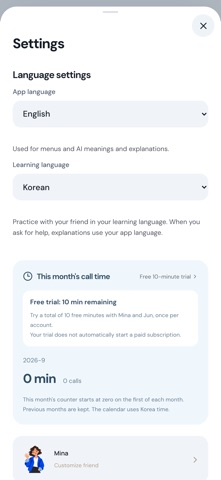
Choose English, Korean, Japanese or German as your app language for menus and new AI explanations. Choose your practice language separately. Ask what an expression means or how to say something. When enough context is available, an explanation card shows the meaning and an example. Your friend then returns to your practice language.
Remember and reuse
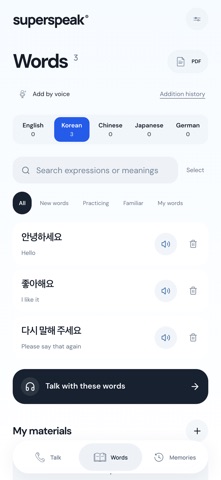
Revisit saved explanations in Memories, hide meanings to practice recall, and prepare expressions for your next conversation. Keep separate notebooks for Korean, Japanese, German, Chinese, and English. Add words by voice or bring a PDF. English level estimates and automatic grammar assessments currently apply to English only.
Create your own friend
Plans of 300 or 1,200 minutes include custom friends in addition to Mina and Jun. Choose a name, appearance, personality, interests, city, and main language. Store up to two custom friends and create up to three per calendar month, based on Korea time. The 100-minute plan includes Mina and Jun.
Your records, on your device
Conversations and vocabulary are stored on your current device. Export and restore a backup in Settings before changing devices. Restoring purchases does not transfer learning records.
Monthly subscriptions
Choose 100, 300, or 1,200 conversation minutes per month. Your local price is shown in the App Store before purchase. Connected time includes your friend's replies and pauses during a conversation. Unused minutes do not roll over, and extra charges are not applied automatically.
Subscriptions are charged to your Apple Account and renew automatically until canceled. Manage or cancel renewal in Apple's subscription settings before the renewal date. Restore purchases from the subscription screen. The initial 10-minute app trial is separate from an App Store subscription free trial and does not automatically start a paid subscription.
Friends are fictional AI characters. Captions, explanations, and corrections may contain errors. AI features send audio, relevant conversation context, and selected materials to OpenAI after your consent. Withdraw consent or delete your information in Settings. Deleting app information does not cancel an Apple subscription.
Privacy Policy: https://superspeak-app.vercel.app/legal/privacy-en.html
Terms of Use (EULA): https://www.apple.com/legal/internet-services/itunes/dev/stdeula/
Support: draftup@naver.com
App menus and explanations support English, Korean, Japanese and German. Your device’s preferred language sets the initial app language. Settings has two language choices: app language for menus and new AI explanations, and learning language for practice.
What's new (v1.1.2)
Tap a thumbs-up or pencil reaction during a call to see brief expression feedback and, when useful, a more natural alternative. Explanations now focus more closely on the word or expression you asked about. We refined the illustration style and consistency of default and custom characters across daytime, evening and sleep, and fixed a storage connection issue when reopening the app. Learned expressions are now on by default, while your choice to turn them off is preserved. We also fixed clipped captions when scrolling during speech. The notebook supports expressions from multilingual conversations and excludes the app language unless it is also your learning language. We also strengthened account access and handling of overlapping requests.