Description
Still messaging articles and videos to yourself, only to never open them again?
LinkSorter makes saving a single step. In YouTube, Facebook, Instagram, Threads or LinkedIn, tap Share and choose "Save to LinkSorter". One buzz and it's saved — no folders to pick, nothing to type. LinkSorter sorts it for you, and picks one saved link each day so good ideas don't get lost.
ONE TAP, NO DECISIONS
• Tap Share in YouTube, Facebook, Instagram, Threads, LinkedIn or any app and choose "Save to LinkSorter"
• Platform and type are tagged automatically: video, post, article, job, profile
• Copied a link? Open LinkSorter and tap "Paste" to save it
• Works with Shortcuts and Siri: run "Save to LinkSorter" from Back Tap or the Action button
SORTED INTO CARDS
• Titles, summaries and thumbnails are fetched for you and shown as cards
• Keyword tags are picked from each title and text; tap a tag to filter
• Full-text search across titles, summaries, tags and URLs
SAVED, NOT FORGOTTEN
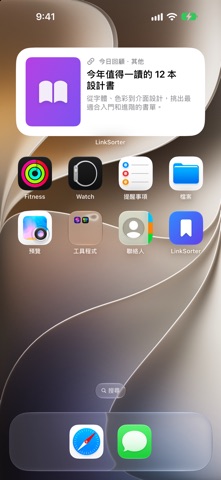
• "Daily Pick" Home Screen widget shows one of your saved links each day
• Tap the widget to open that card, read the summary, then decide whether to open the original
YOUR DATA STAYS ON YOUR PHONE
• No sign-up, no account
• No ads, no tracking, no analytics
• Sorting and tagging happen on your device; nothing goes through our servers
PRICING
• Free to download, with room for 50 saved links
• LinkSorter Pro: a one-time purchase for unlimited links — not a subscription
• Deleting old links frees up room
Available in English and Traditional Chinese.
Questions or ideas? You'll find me on the About page in the app.
What's new (v1.0.4)
- Map links: places shared from Google Maps or Apple Maps are now sorted under "Maps · Place", and Google Maps links also show the place's name and address.