Description
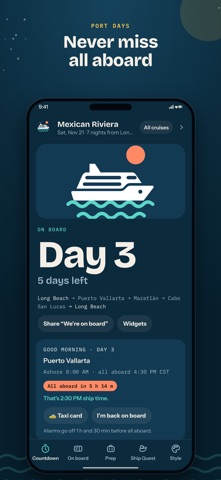
Count down to your cruise in style, then keep everything you need for the trip in one place.
COUNTDOWN WIDGETS
• Big, beautiful home screen widgets: days, days + hours, weeks or "sleeps"
• Nine color themes, from Midnight Sailing to Tropical Punch
• Keep several cruises going at once, each in its own colors
PLAN THE TRIP
• Fill in your whole itinerary by pasting your booking: dates, ports, times, ship and cabin
• 280+ ports and private islands, with day-by-day planning
• Packing list matched to your trip's weather, plus a health and first aid section
• Plan-ahead to-dos counted back from your sail date
• Travel party, emergency and travel insurance info, kept on your phone
• Save a photo of your deck plan and zoom in anytime
ON BOARD
• Works offline at sea: your countdown, plans, cruise card, alarms and game don't need ship Wi-Fi
• All-aboard alarms on port days
• Shows ship time and port time side by side
• Port weather, a taxi card in the local language, and a meet-up spot for each port
• "If found" lock screen picture and widget with your cabin and ship, in case your phone gets lost
SHIP QUEST, THE FAMILY GAME
• Duck finder, daily cruise bingo, Photo Hunt and a daily challenge
• Passport stamps for every port, and a slideshow of your trip at the end
• One phone keeps score for the whole family
YOUR SAILING RECORD
• Nights, sea days, ports and badges that grow with every cruise
• Add the cruises you took before Shipshape
PRIVATE BY DESIGN
• No account needed. Your trips, lists and photos stay on your phone
• Back up to a file and save it to iCloud Drive, email or anywhere you like
Shipshape is free, supported by one small ad bar.
Shipshape is an independent app and isn't affiliated with any cruise line.
What's new (v1.0.2)
Thanks for the feedback! This update:
- Edit a cruise after you create it: change the dates, ports, ship or name any time. Tap Edit at the top of the Countdown, or use the menu in My cruises. Your lists and progress stay put.
- Easier setup: the Next button now stays at the bottom of the screen, and every step has a Back button.
- Remove to-dos that don't apply: tap "Remove to-dos that don't apply" on the To-dos list (with undo).