Description
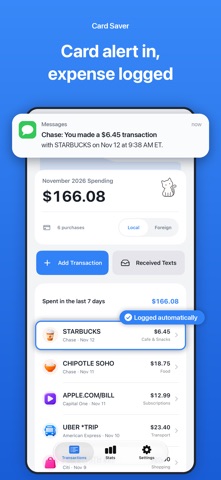
Card Saver turns the card alert texts you already get into an expense log, automatically.
■ TEXT IN, EXPENSE LOGGED
Connect the shortcut once. Each card alert text is recorded with amount, merchant, card and time. Refunds are subtracted, and the same purchase is never counted twice.
■ READS ALERTS FROM MANY COUNTRIES
Understands card alert texts in English, Japanese, Traditional Chinese and Korean, from the US, Japan, Taiwan, Hong Kong and Korea. Merchants are sorted into categories automatically.
■ NO SIGN-UP, NO BANK LOGIN
No account and no linking to your bank. Everything stays on your iPhone.
■ SEE WHERE YOUR MONEY GOES
This month's total, the last 7 days and spending by category, in your local currency. Foreign purchases are kept separate by currency.
■ PASTE OR TYPE
Got an alert by email or app notification? Copy and paste it, or enter an expense by hand. On supported devices, on-device AI reads unfamiliar formats.
Automatic logging works with alerts that arrive as text messages. Turn on text alerts in your card app.
■ CARD SAVER PRO
AI analysis and spending charts come with Card Saver Pro, an auto-renewing monthly or yearly subscription. It renews automatically unless canceled at least 24 hours before the current period ends.
Terms of Use (EULA): https://www.apple.com/legal/internet-services/itunes/dev/stdeula/
Privacy Policy: https://runfekim.github.io/cardledger-support/privacy.html
What's new (v1.4)
When a card alert arrives, an entry form opens with the amount, merchant, category and time already filled in. Fix anything and save, even when the amount couldn't be read. Several alerts in a row are kept in your inbox so you can review them in order. You can now add your own categories, choose the home currency for totals, and paste an alert right from Add Transaction. We also fixed spending goal reminders that could be skipped.