Description
You took that screenshot to "look at later." Did you ever look?
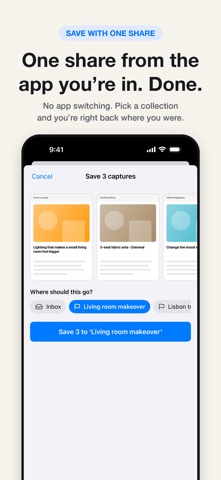
Capture Todo puts screenshots and links into collections by topic, with one share from the app you are already in. I built it alone and I use it every day.
[This is for you if]
# Your photo library has hundreds of screenshots and you can never find the one you need.
# You screenshotted a notice and still missed the deadline.
# Your "Watch Later" list passed 300 videos.
# Pasting things into a notes app lasted three days.
# You are tired of apps that want an account and a monthly fee.
[One share and you are done]
From a screenshot, a YouTube link, or an audio file: Share → Capture Todo → pick a collection.
• You never leave the app you were in. You go right back once it is saved.
• Not sure where it belongs? Drop it in the Inbox and sort it later.
[Everything lands by topic]
"Living room", "Lisbon trip", "To read". Screenshots, links, recordings, and to-dos about one topic sit together.
• They stay out of your photo library.
• Mark a collection as a project, an area, a resource, or archived.
[Tap a line to make a to-do]
The app reads the text in a screenshot of a notice or a message. Tap a line and it becomes a to-do.
• Dates like "by Nov 20, 6 PM" are found for you and offered as due dates.
• The original screenshot stays attached, so you can check it again.
• If you like, to-dos also go to Apple Reminders so you get an alert on time.
[See your deadlines]
Give a collection a deadline and it shows at the top of the To-dos tab with the number of to-dos left.
[Videos and recordings too]
• YouTube links are saved with the moment you were watching.
• For audio files, add notes at the moment you are listening to.
[Your data stays on your iPhone]
• No account. No server.
• No ads and no tracking.
• Text reading and transcription run on the device.
• No subscription and no in-app purchases. Get it once and keep using it.
Available in English, Korean, and Japanese.
If something bothers you, tell me. I read everything and I will fix it.
What's new (v1.3)
• Collection suggestions: when you save a capture, the app reads its text on your device and preselects the collection that fits. Tap another to change it.
• Find to-dos with AI: add your own AI key and the app finds to-dos and due dates in a collection and adds them for you. The app works the same without a key.
• Help now explains the new features.