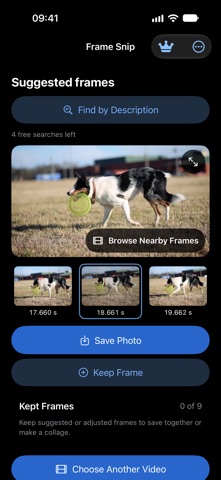
Turn a moment in a video into a photo you can keep. Open a clip from Photos or Files and start with up to three suggested frames. Browse nearby frames one at a time to catch the exact moment, then save a photo at the video's original resolution with no watermark.
Keep up to nine frames and bring them together in a grid collage. You can also make a collage from photos you already have.
Remember what happened but can't find it in the clip? Describe the scene and let AI suggest matching frames. The first search needs a one-time download of about 255 MB. After setup, AI search works on your iPhone with locally available videos, even offline. Your videos, frames and search descriptions stay on your device.
Save individual photos and grid collages for free, and try up to five successful AI searches. A single purchase of Frame Snip Pro unlocks unlimited AI searches, batch saving and Cover and Filmstrip collage layouts. No subscription.
What's new (v1.1.0)
• Compare adjacent frames side by side, then save your chosen still with one tap.
• Set the start and end of a video on the thumbnail timeline. Pro can export the selected clip.
• Pro can crop photos and customize frames with different styles, colors, widths, and adjustable inner and outer corners.
• Switch videos above the preview, or send a video to Frame Snip from the system share sheet.
• Improved model download retries for Find by Description.