Description
General DB is a general-purpose database app that lets you record information quickly and easily.
Try our FREE Private DB app to get a feel for General DB before you buy.
For example, if you have a bottle collection, you could make a table with these fields: Date Acquired, Bottle Type, Bottle Origin, Shape, Notes. Then whenever you add a new bottle to your collection, you can add a row to the table describing it.
If you want to track visits to different vacation sites, you can make a table with fields for the Date Visited, Location, Description, and Attraction. As you visit the sites, you can add corresponding rows to your table.
After you add rows to your tables, they will be:
* Searchable
* Sortable
* Selectable
Many apps are too specific to a subject, but General DB is flexible enough to handle many, many needs, such as:
- Inventories
- Customer info
- Membership lists
- Tracking Logs
- Accounts
- and many more !
No database knowledge is required to use this app, but you will pick some up as you go!
For power users:
General DB allows easy data entry into a full-fledged SQLite database. To do so, it enhances it with field formats.
The field formats supported are Text, Number, Date, Time, Duration, Location, Photo, Barcode, Raw, Picker, and Lookup Table. There are convenient buttons next to some fields for easier input.
For administrators or IT manager, you can create a master database of reference information that you don't want your users to modify. This master database can be published on the internet and either the Private DB app or General DB can download and view it.
Some more powerful features:
- SQL Console for executing SQL statements
- Create virtual tables from CSV files
- Import CSV files into tables
- Preview all the lines in a file before importing it
- Execute SQL files
- Extract .zip or .gz files
- Manage your image files and create thumbnails
- Custom picker types to select values from a list
- Add your own image files from you computer
- Mark SQL statements as favorites
- See and execute past SQL statements in the History
- Easily create a SQL VIEW (subsets of fields from a table)
- JOIN 2 or more tables or views for relational capabilities
- Export selected rows from your tables to a file
- Email your files to others
- Share your database or other files
- Create databases
- And much more!
If you have any questions, or if you need your business database customized for your iPhone or iPad, feel free to contact us on our website.
What's new (v6.1.1)
Updated user interface and new support for creating virtual tables from CSV files!
Some uses of virtual tables:
- Scroll through the rows of a file before importing them into a database table
- Keep reference tables in their original files for easy lookup.
- Sort and search the CSV files without having to import their rows.
- And much more!
Also new:
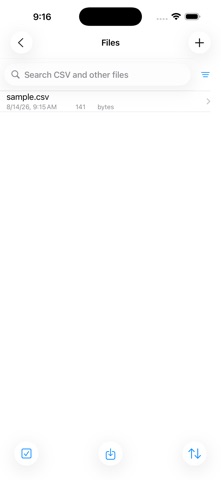
- The Files tab is now a folder button in the bottom toolbar on the Tables List.
- The app info button is now in the top left corner of the Tables List.
- More help is available for importing or creating virtual tables by tapping the question mark button on the CSV File screen.
- Improved selection of tables and files. Tap the square checkmark button in the toolbar and then tap the items to act on.
- Display options for the Tables List can be changed via the filter button on the right of the search bar.
- When importing rows or creating virtual tables, specify field names, field formats, and where data starts by line number.
The SQLite engine has been updated to 3.53.4. Some major SQLite improvements since the last release of this app include new date and time functions, new JSON capabilities, RIGHT and FULL OUTER JOIN, and much more. Visit the SQLite website for more information.
There is a new SQL file type to distinguish from CSV files, accessible via the filter button on the Files List.
Text files are labeled CSV files now, but that still includes tab-delimited and pipe-delimited as well. UTF-16 text-encoded files are now supported, which are common on Windows computers.
Recent updates to the OS have improved the downloading of files into the app from a web browser app or Dropbox, making the built-in features in previous version of this app unnecessary. Please use the new features or the Files app to copy files into the app. Dropbox file sharing can be performed by having the Dropbox app installed and interacting with it.