Description
Browse more sites at once with Multi Tab Web Browser — a visual, fast, and modern web browser designed to help you organize multiple websites in a whole new way.
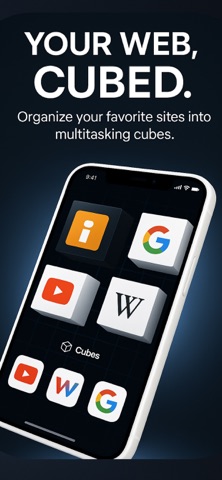
Multi Tab Web Browser lets you open, swipe, and manage your favorite websites using an interactive 3D cube interface. Instead of jumping between traditional tabs, you can organize your browsing into visual cubes and move between websites with smooth gestures.
Whether you use it for research, work, shopping, entertainment, studying, or daily browsing, Multi Tab Web Browser gives you a cleaner and more flexible way to keep your web pages organized.
A New Way to Browse Multiple Websites
Multi Tab Web Browser is not just another browser. It is a multitasking web browser built around 3D cubes, giving you a more visual and intuitive way to browse, switch, and manage multiple websites.
Start with 1 interactive cube that can hold up to 4 websites. VIP members can unlock 4 interactive cubes, each with up to 4 websites — allowing access to up to 16 web pages in one organized browsing space.
Key Features
3D Cube Web Browsing
Browse through websites using a smooth and interactive cube interface.
Rotate, swipe, and switch between your favorite sites in a more visual way.
Organize different websites into cubes for work, study, shopping, entertainment, news, or personal use.
Multi Tab Web Browser
Open and manage multiple websites without the chaos of traditional tabs.
Keep your browsing organized with visual web spaces.
Switch between pages quickly using natural swipe gestures.
Browse More Sites at Once
Use one cube with up to 4 websites.
Unlock up to 4 cubes with VIP access.
Manage up to 16 websites in a modern multi-tab browsing experience.
Private Browsing Options
Use private browsing features when you want a more discreet web experience.
Keep your browsing sessions more organized and focused.
Create separate browsing spaces depending on how you use the web.
Custom Web Cubes
Create and save your own custom cubes.
Group websites by topic, activity, or routine.
Build a browsing setup that fits the way you work, study, and relax.
Independent History & Favorites
Each cube can help you keep your browsing experience more organized.
Save favorite websites and access them faster.
Keep different browsing contexts separated and easier to manage.
Smooth Navigation
Navigate between websites with simple gestures.
Swipe through web cubes instead of constantly searching through tabs.
Enjoy a modern interface designed for multitasking and fast access.
Designed for Productivity and Everyday Browsing
Multi Tab Web Browser is useful for:
Researching multiple sources at once.
Comparing products while shopping online.
Keeping work tools, dashboards, or websites organized.
Studying with several references open.
Switching between news, social media, entertainment, and personal sites.
Browsing visually instead of managing endless tabs.
Why Choose Multi Tab Web Browser?
Because your web browser should help you stay organized, not create more clutter.
Multi Tab Web Browser gives you a fresh way to browse multiple websites, combining multitasking, visual organization, private browsing options, and a unique 3D cube interface.
Use it for work.
Use it for study.
Use it for shopping.
Use it for entertainment.
Use it to browse more sites at once.
Some features, including additional cubes, custom cubes, and access to the full multi-page browsing experience, may require a VIP subscription.
Download Multi Tab Web Browser today and discover a smarter, more visual way to browse the web.
Main page and contact:
https://cubifyapp.netlify.app/index.html
Terms of service:
https://cubifyapp.netlify.app/terms.html
Privacy policy:
https://cubifyapp.netlify.app/privacy.html
What's new (v1.2.6)
Improved cube rotation performance for a smoother browsing experience. Animations are now better cached and optimized, making transitions between web cubes faster, more fluid, and more responsive. Subscriptions have been removed. All features are now unlocked, including web cubes, custom browsing spaces, and the full multi-tab browsing experience.